(4) Production Order Maintenance
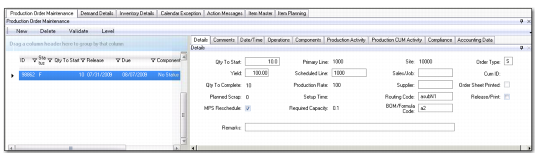
You can access Production Order Maintenance within the workbenches. Production Order Maintenance lets you view individual item production order supply records for items that display in the MSW Schedule Grid or PSW Sequence Grid. Production Order Maintenance uses a horizontal layout and supports scheduling of work centers, production orders, and production lines. You can view, monitor, and interact with details of a production order within the Production Order Maintenance tab.
The left side of Production Order Maintenance displays production order summaries with the order ID, status, quantity ordered, and release date columns. The right side displays production order details, comments, date/time, operations, order relationships, component availability data, production activity, production CUM activity, compliance data, and accounting data for the order.
Using these tabs, you can view several aspects of data that have an impact on the production order and alter data without leaving MSW/PSW. Production Order Maintenance also lets you to create a new order, delete an order, or validate an order. When you validate the order, the system checks for correct data in production order fields and when errors occur, it indicates which fields require that you correct data.
After you complete production order updates, you can save changes globally by clicking the workbench toolbar Save button. Some validations take place in real time when you modify the order on the workbench; others are performed during the save process. The Validation button invokes the validations that would be performed during the save process.
Production Order Maintenance
Production Order Maintenance auto-selects the first production order on the selected Schedule Grid due date and displays additional production orders in the past and future. Scroll up to view orders with prior due dates; scroll down to view orders with future dates.
When you select an item on the Schedule Grid with a supply/demand issue, Production Order Maintenance displays any planned orders MRP generated to resolve the supply/demand issue and existing production orders of various statuses associated with the item.
For each due date, production orders display by status in this order: P(lanned), F(irm planned), A(llocated), E(ploded), R(eleased), C(losed). Then, for each status, they display by production order ID.
If you select a different production order in Production Order Maintenance, the Schedule Grid does not change.