Schedule Horizon
MSW gives you user-configurable control over where the MPS schedule horizon ends and where the future window begins. MSW calculates data differently in the scheduling horizon display than in the future window. Visual indicators only apply to the defined scheduling horizon.
Fields in Work Center Maintenance (14.5) are also available in Production Line Maintenance (18.1.1) and help control the schedule horizon. Specifically, you set the Horizon End field to either Day, Week, or Month, then set the number of periods for the increment in those programs. The system displays a read-only calculate date. The system calculates the date from period and period number, so if you set Horizon End to Day and Period to 5, the Calculate Date is five days starting with today. If you set Horizon End to Week and Period to 4, then the Calculate Date is four weeks from now including today.
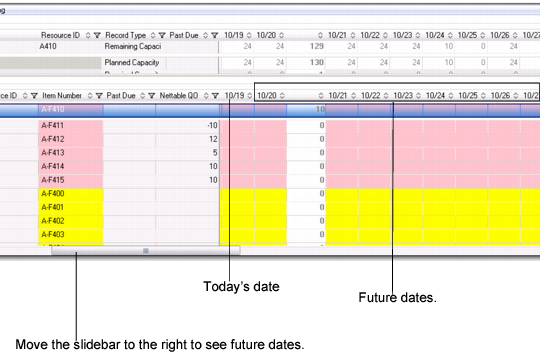
Scheduling Period Example shows a sample time line in the MSW Schedule Grid. The left side shows the Schedule summary, while the right side shows individual dates, starting with today’s date of October 19.
Scheduling Period Example
Even though your future horizon may not fit into the.NET UI window on your screen, you can use the slidebar to display day-by-day future dates. When you scroll into future days, the day-by-day regions of the Capacity and Supply/Demand Panels are also scrolled.
Within MSW, only production orders with a status other than P within the MPS Scheduling Horizon impact these calculations:
• POH
• Available to promise
• Required capacity
MSW does not calculate for planned orders inside the scheduling horizon; however, you can view planned orders using supporting data in other programs within the MSW. To view a planned production order, view data in:
• Demand Details tab
• Production Order Maintenance tab
• Supply row in Supply/Demand Panel
The scheduling horizon impacts the color logic, POH, auto firm, and resource required capacity within the Schedule Grid.