Defining PSW Sequencing Horizon
The PSW horizon setting is based on calendar days, not the shop calendar. Regardless of their status, past due production orders on the production schedule that have not been completed by the current date always display. Past due production orders do not have to be in status Released to show on the PSW.
For manageability, the PSW should contain a small data set so that you can easily view and manage production lines, release date buckets, and release date details. So, for example, if you set the horizon for one day, you can see all production lines and easily schedule from one to ten lines in a single view. You can also see the production schedule across several production lines.
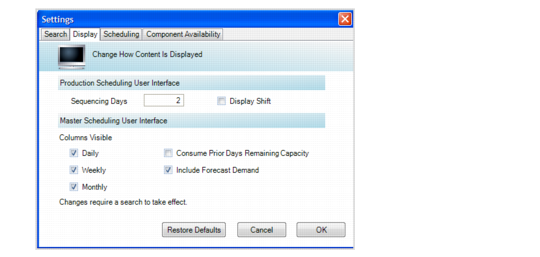
You define the sequence horizon dynamically through the Options pull-down menu. You select Option, then Preferences, then the Display tab to set the sequence horizon.
Settings Window, Display Tab
Sequencing Days
Enter the number of days for the sequence horizon. When working on a production schedule, the typical horizon is 24 hours to 5 days.
During production sequencing—that is, prioritization of production orders within the sequence horizon—you can view supply and demand, and any potential issues for sequence schedules, then drill down to determine the problem and possible resolutions.
Display Shift
Set this field to Yes to display shifts in the Sequence Grid. Shift buckets display:
• When orders exist for the item/shift/release date
• When capacity exists for a shift.
Note: The shift still displays when its remaining capacity is zero or less than zero because when remaining capacity is zero or less than zero, production orders have been scheduled against that shift and therefore, display in the PSW. Shifts do not display when no work orders have been scheduled against the shift and the planned capacity for the shift is zero, indicating the shift is not in use.
• For standard capacity
• For exception capacity
You set the shift start time in Production Line Calendar Maintenance (18.1.22.1).