Viewing Capacity
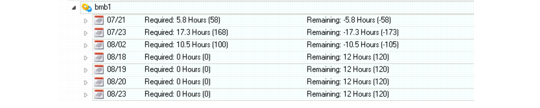
You can view the required capacity and remaining capacity of a production line by release date.
Example: For release date 1/1/2011, there are two shifts: 1 and 2. The orders currently placed under the release date consume two hours under shift 1 and three hours under shift 2. The capacity row for the release date is a summation of what is scheduled under the various shifts for the release date in question.
Unlike the MSW, the PSW does not display a Capacity Grid; instead, you view required and remaining capacity at the production line level. This is because you use the Sequencing Grid to manage production orders by release date, not due date. In some cases, the order release/due date are the same, and in other cases, they differ.
When you select a resource from the Resource Navigator, the Sequence Grid displays the production line and a list of release dates, based on the setting of your sequence horizon. For each release date header record, the system displays required and remaining capacity information.
When you expand release date details, the Sequence Grid displays the capacity/required capacity of each shift header record.
Sequence Grid
The following topics explain fields within the PSW.
ID
The valid system production order identifier.
Shift
The production line shift as defined in Production Line Calendar Maintenance.
Seq
The production order sequence number.
Run Seq 1, 2
You use run sequence fields as a reference to control the sequence in which firmed orders are sequenced on a production line schedule. When multiple items are produced on a single production line, efficiency can be improved by producing the items in a certain order. Run sequence fields display the attributes of an item; for example, you can have a run sequence of small, medium, or large or white, red, black assigned to your various items.
Item Number/Description
The valid item number and description.
Status
The production order status code. Production order status codes correspond to stages in a production order’s life cycle:
• Planned
• Firm planned
• Batch
• Exploded
• Allocated
• Released
• Closed
The status of a production order determines how much control you have over its bill, routing, inventory allocations, inventory transactions, and labor.
Quantity Ordered
The planned quantity of the production order. Compare this with the closed quantity, which is the good quantity reported for the order.
Release Date
The date this production order is scheduled to be released to production. The date you enter here initially changes to the actual release date when you release and print the production order. Release dates also determine the date components are required. Normally components are picked when an order is released.
When you move an order in the PSW from one release date to another, the system changes the release date on the order. The change in release date is reflected immediately on the PSW. The order does not have to be in any specific status for this to happen. Only non-planned orders show on the PSW.
The system calculates either release or due date, creating, in effect, forward or backward order scheduling.
Due Date
The due date is the date this order is due to be completed. This is the date you plan to have product available for shipment to the customer or issue to another manufacturing order. All MRP plans are based on this due date.
Resource
The production line as listed in the Resource Panel.
Site
The site to which the resource belongs.