Defining Shifts/Sequences
Sequencing determines the order in which manufacturing processes production orders. Within QAD EE, sequenced orders have a unique sequence number that identifies the order as sequenced. Sequencing of production orders is by release date and optionally, shift when shifts are used. Sequence IDs are unique to each shift. Within PSW, the order in which shifts display is based on the shift start time defined in Production Line Calendar Maintenance (18.22.1.22.1).
Production scheduling determines the order start (release) date and sequence, and sequencing is by release date in the PSW. The system considers the release date and sequence of the production order to determine which is consumed first.
Note: When working with Component Availability, the system prioritizes by order status, release date, then sequence for component consumption. When you have multiple shifts per day and the sequence number repeats within that day, Component Availability cannot determine the shift. For more information on Component Availability, refer to
Component Availability.
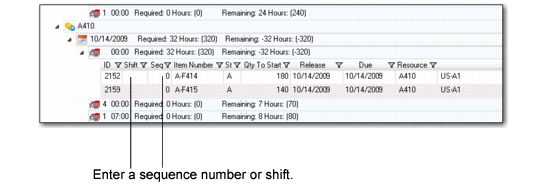
To change an order from unsequenced to sequenced or to change an existing sequence number, select a single production order and enter a sequence ID in the Seq field. You modify the shift by entering a shift number in the Shift field.
.
Sequence and Shift Field
Once you update the sequence, the Sequence Grid displays the new position of the production order per the specified sequence. If the sequence number you enter is assigned to an existing order, PSW resequences the existing sequenced order number by increasing the number as well as all subsequent orders for the release date.
Dragging and Dropping for Sequence/Shift Changes
You can also select one or more production orders to sequence and drag and drop from Production Order Browse to the Sequence Grid or within the Sequence Grid. Once you drop the orders, the system assigns the sequence number to the orders and assigns as greater than the prior sequenced numbers. The system also assigns shift numbers.
If you change production order release dates, PSW sets the sequence and shift to 0 (zero). You cannot drop an order onto a production line that does not have a release date.