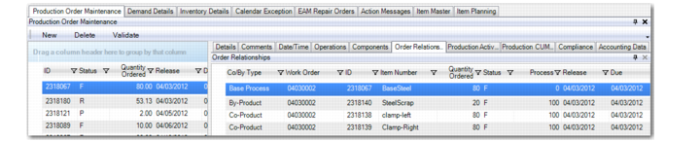
Production Order Maintenance Order Relationship Tab
You can use the Order Relationship Tab within the Production Order Maintenance frame at the bottom of the workbenches to view order relationships as defined in production order sets.
In the MSW or PSW grids, when you select a production line or work center and an item, the system displays all production order records for the selected item.
When you select the Order Relationship tab, you can view related production orders. When you select an item in the schedule grid that has related work orders where there is only a match on work order numbers, the Order Relationship tab displays all related orders where a production order number matches the product order number of the production order record you select.
Order Relationship Tab depicts order data in the Order Relationship tab. The frame shows joint product order sets. All other types of orders that have the same order number (that is, split orders) do not display in the frame.
Order Relationship Tab
Co/By Type
Co-/by-product orders define a joint order set. When a co-/by-product order is scheduled, the system creates a joint work order set. The relationship among these orders is defined technically by the order type and by having the same WO number.
When you modify any order in the order set, the system automatically synchronizes the changes across all orders in the order sets.
ID
The work order identification number.
When an order relationship is created via the work order ID, you may need to maintain the relationships between the orders, such as order quantities or due and release dates.
Item Number
The item for a base process, a co-product, or by-product.
Quantity Ordered
This field displays the quantity per base process.
Note: In Process/Formula Maintenance (15.18) or Co/By-Product Maintenance (15.12.1), you define how many co- or by-products to create from one base process.
Status
The production order status, that is, Planned, Firm, Exploded, Allocated, Released, or Closed.
Process
The percentage as depicted by forecast percentage, specified in Formula Maintenance. When the Process percentage does not display, the value is 0% (zero).
Release
The order release date.
Due
The order due date.
BOM/Formula Code
This field is display only for base process orders. You can modify it for co- and by-product orders.
Adjust Co/By Order Quantities
Enter Yes or No to adjust the quantities for the order.
Yes: The system automatically rescales all order quantities in the joint order set. The work order status must be E, A, R, or C to optionally rescale quantities. Joint order quantities are recalculated automatically when:
• Order quantity changes on a joint order with an Firm status,
• Status of a work order changes from any status to Firm.
• Status of a work order changes from Batch, Planned, or Firm, to Firm, Exploded, Allocated, or Released.
The system calculates the quantities for joint orders from quantities entered in Co/By-Product Maintenance (15.12.1). Order quantities for a joint order set can be recalculated automatically or maintained manually, depending on the work order status.
No: The system changes only the order being modified; other orders in the set are not modified. When this happens, the system automatically changes the order status to E.
Adjust Co/By Order Dates
Enter Yes or No to adjust co- or by-product order dates.
Yes: The system resynchronizes the dates for all orders in the joint order set. The work order status must be E, A, R, or C to optionally adjust dates. Firm status orders always resynchronize the dates for all orders in the set. Default due dates for orders in a joint set are calculated using the manufacturing lead time for the base process. Existing current EE logic that allows for modifications to the order joint set must be preserved.
No: When No, the system only modifies the order you change. Other orders in the set are not modified. When this happens, the system automatically changes the order status to Exploded.
The order set is deleted only when you delete the base process order or the last co-product order.