Update Dates and Quantities for Order Sets
For production lines, you can schedule the co/by-product items, modifying the order header level data only.
You can schedule co/by-product discrete orders on production lines. This is because repetitive backflushing does not support backflushing of co/by-product items.
For work centers, you can schedule co/by-product order sets or co/by-product items, modifying order header level data only.
The workbenches do not support operational-based scheduling, so, you cannot modify operational due or release dates for co-/by-products.
You can make the following changes to the order sets:
• Update the quantity in MSW Schedule Grid
• Update the quantity and date in the PSW Sequence Grid
• Update the quantity and date in Production Order Detail Maintenance
• Update the quantity and date in the Order Relationships tab in Production Order Maintenance
• Optionally synchronize quantity changes in the Order Relationships tab
Updating Quantities
From the workbenches, you can control how many co-/by-products you expect to generate from the base process. You can make changes in the Schedule Grid or Sequence Grid or in Production Order Maintenance tabs within the workbenches.
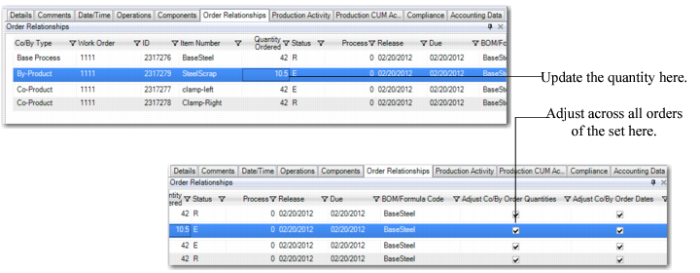
When the order has an E(xploded) status, you can optionally synchronize the changes across all orders in the order set or just apply the change to the single production order record. You select the Adjust Co/By Order Quantities field to apply changes to all orders.
Example: The default expected co-/by-product quantity is 10, but you adjust the value to 12. The system prompts you to synchronize all orders since the order status is E You specify Yes, and the system synchronizes.
The following figure depicts a co-product order within the Order Relationships tab.
Change Quantity
Updating Dates
You can update the production order dates of a co-by-product work order of a joint set in the workbenches. You can make date changes in the Sequence Grid or in Production Order Maintenance tabs within the workbenches. For example, using the
Adjust Co/By Order Dates field in the Operational Relationship tab of the Production Order Maintenance within the workbenches, you can control expected release/due dates of each order within the order set. The system always synchronizes across the orders when you modify the date. When you deselect the Adjust Co/By Order Dates field, the system does not synchronize changes you make to the order.
Example: The default expected co-product release or due date is 4/01; however, you select Yes to adjust the date and change the date to 4/02. The system synchronizes all order dates to 4/2 in the order set.