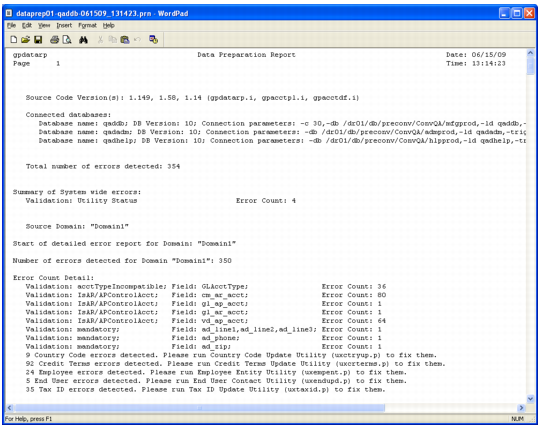
Data Preparation Report (gpdatarp.p)
This report highlights any data issues you must resolve before conversion such as:
• Data that is missing from the old Financials, but required in the new Financials.
• Data that exists in the old Financials, but is not allowed in the same state in the new Financials.
• Data that is invalid in the old and new Financials.
Warning If this report does not indicate an error, review the county and state data in eB2.1 and later before conversion to eliminate similar or inconsistent entries. Compare pre- and post-conversion state and county data to verify data integrity. Otherwise, the conversion could make state and county data unusable.
This report is the gatekeeper for the conversion. You cannot run the conversion until this report has zero errors.
Although the name indicates that it is a report, it creates a QAD Work Table (qad_wkfl) record in the database once no errors are found. The conversion looks for this record before it begins.
The report output file name is dataprep#-<dbname>-<date>_<time>.prn. Where # represents a segment number. The report can have multiple segments.
Data Preparation Report
For eB2.1 and later, one execution processes all active domains.
The following new utilities are provided to assist with mass correction of some data errors:
• Country Code, (uxctryup.p)
• Tax ID (uxtaxid.p)
Run these utilities if the Data Preparation Report indicates that there are errors in these areas. Their use is optional because the data can alternatively be manually corrected through the menu functions listed on the respective utility’s reports.
You probably must run the Data Preparation Report multiple times before all the errors are resolved.
Running this report does not affect future processing.
Account Type Incompatibility Error
Most errors shown on the Data Preparation Report are self-explanatory. One exception is the Account Type Incompatibility error. In the old Financials, you can define an account in Account Code Maintenance as an Expense type account. You can use that account code in static data for non-expense type purposes (for example, in Product Line Maintenance as an Inventory account).
The QAD Enterprise Edition Financials require that accounts used for specific purposes must have the appropriate account type definition based on the financial statement where they appear. You define account codes used in database fields for static data associated with the balance sheet as Type (ac_type) A(sset) or L(iability); not I(ncome) or E(xpense) in Account Code Maintenance (25.3.13, glacmt.p).
Similarly, you define account codes used in database fields for static data that are associated with the income statement as type I(ncome) or E(xpense); not A(sset) or L(iability).
For example, the Inventory Account Code (pl_inv_acct) or the WIP Control Account (pl_wip_acct) used in Product Line Maintenance is defined as an Asset or Liability type account, preferably Asset. The important thing is that the account code is represented on the correct financial statement. It is not acceptable to use an account code normally used for Purchases Expensed as Inventory or WIP Control Accounts.
There are two ways to resolve Account Type Incompatibility errors:
• If the account code also appears as a conflict on the GL Account Type Utility report, you can correct the account code. Run the utility in update mode and specify an alternate account code to resolve the conflict. The replacement account is applied during conversion and therefore has no affect on transactions occurring before conversion.
• If the account code does not appear as a conflict on the GL Account Type Utility report, the only course of action is to update the field in error (for example, pl_inv_acct). The field is updated through its maintenance program using an account code having the appropriate account type.
Warning
Using the second method to resolve Account Type Incompatibility errors affects future transactions once you make such a change. Therefore, it is only done after closing the database to transaction processing in preparation for conversion.
Do not correct these errors by writing a Progress utility to update the account type on the offending accounts. Doing so causes the Balance Sheet to be out of balance and Retained Earnings to no longer match the amount initially recorded.
Changes to correct these errors will result in information being reported differently on financial reports after conversion. Continuing the example from before, if a Purchases Expensed account were used as the Inventory account in Product Line Maintenance, any transactions involving this account appear on the Balance Sheet post-conversion. Before, they were on the income statement. For instance, a PO receipt involving such an account is reflected as inventory on the post-conversion balance sheet.
The Account Type Incompatibility errors are a result of the tighter controls used in the QAD Enterprise Edition Financials.
Beginning with QAD 2010.1 Enterprise Edition, Closing accounts are no longer restricted to Asset or Liability type accounts. Any account type (A, L, I, E) is allowed.
Another change introduced in QAD 2010.1 Enterprise Edition is that the Rounding Differences account is no longer restricted to an Income or Expense type account. Any account type (A, L, I, E) is permitted. The Purchase Order Receipts account now must be a Liability type account.
The impact of these changes may be apparent in the Account Type Incompatibility section of the Data Preparation Report. The changes may also be visible when choosing replacement accounts in the GL Account Type Utility for these types of accounts. The changes are apparent to the extent that exceptions involving these account types exist in the pre-conversion environment.
Expected Category by Account Type lists the expected category for each Enterprise Edition account type.
Expected Category by Account Type
Account Type | Category |
Bank Account | Asset or Liability |
Closing Account | any |
Cross-Company Control Account | Asset or Liability |
Customer Control Account | Asset or Liability |
Customer Payment Account | Asset or Liability |
Fixed Assets Account | Asset or Liability |
Inventory Control Account | Asset or Liability |
Supplier Control Account | Asset or Liability |
Supplier Payment Account | Asset or Liability |
Tax Account | any |
WIP Control Account | Asset or Liability |
Purchase Order Receipts | Liability |
Realized Exchange Gain | any |
Realized Exchange Loss | any |
Result of Previous Years | Asset or Liability |
Result of the Current Year | Asset or Liability |
Rounding Differences | any |
Unmatched Invoices | Asset or Liability |
Unrealized Exchange Gain | any |
Unrealized Exchange Loss | any |
Unposted GL Transactions Error
The Data Preparation Report checks for any unposted GL transactions by accumulating General Ledger Unposted Transaction Detail (glt_det) records. It is possible that some of these records can be for a zero transaction amount and therefore do not appear on the Unposted Transactions Register (25.13.14, glutrrp.p). You can delete these zero-amount records using GL Transaction Delete/Archive (36.23.2, mgmgrp01.p).