GL Account Type Utility (uxglacup.p)
In QAD Enterprise Edition Financials, each General Ledger (GL) account has an account type, which specifies how the account is used. These types include control accounts, intercompany accounts (known as Cross-Company Control accounts in Enterprise Edition), and bank and cash accounts. The types also include special accounts (classified as System accounts) dedicated to period closing and exchange rate fluctuations. Any other accounts not falling into these specialized classifications are classified as standard accounts. These accounts are predominantly income/expense accounts, but also include some balance sheet accounts as well.
Control, Banking, Cash, Intercompany, and System type accounts have restrictions on how and where they can be used in transactions. Standard accounts have no restrictions other than they cannot be used for purposes associated with the other account types.
System type accounts can have one only one GL account per domain defined for each individual purpose. For example, only one account can be used for unrealized exchange rate gains in a domain, regardless of the currency involved. Similarly, another single GL account is dedicated to exchange rate rounding differences. The one exception to this rule for System type accounts is PO Receipts. Multiple accounts can be used for PO Receipts.
Intercompany accounts are similar to System type accounts, but they are not classified as a System type account. In the old Financials, you can have different intercompany accounts for the debit side and credit side for each functional area (AR, AP, Inventory, and Fixed Assets) and each entity (and in eB2.1 and later for each domain). QAD Enterprise Edition handles this granularity differently.
Separate accounts for intercompany debits and credits are no longer supported. Further, the intercompany account used for a functional area must be the same for that functional area in every entity within the same domain. If this level of detail is not desired, you can use the same Intercompany account for any or all functional areas in a domain.
The utility distinguishes between tax accounts used for AR and AP. However, separate account codes are not required for each of these areas. You can use the same account code for AR and AP taxes if desired.
All banks belonging to the same entity (within the same domain, if applicable) and having the same cash account must also share a payment in process (PIP) account if the Use Payment In Process Acct field is enabled in Accounts Payable Control. Similarly, all banks belonging to the same entity (within the same domain, if applicable) and having the same cash account must share a common drafts payable account if the Use Draft Management field is enabled in Accounts Payable Control. You can use the same account for PIP and drafts payable when there is an overlap of bank code, entity, and cash accounts for PIP and drafts payable. This functionality is possible because both account types are supplier payment accounts in QAD Enterprise Edition. These requirements are only applicable when European Accounting is not being used for the associated domain (if applicable) or database.
For example, consider the following bank definitions, which assume that both fields in Accounts Payable Control are enabled and European Accounting is not used in the domain.
Bank Definitions
|
Domain
|
Entity
|
Bank
|
Cash Acct
|
PIP Acct
|
Drafts Pay Acct
|
|
demo1
|
1000
|
AA
|
1040
|
2110
|
2300
|
|
demo1
|
1000
|
A2
|
1040
|
2111
|
2300
|
|
demo1
|
1000
|
BB
|
1041
|
2110
|
2300
|
|
demo1
|
1000
|
B2
|
1041
|
2110
|
2301
|
|
demo1
|
1000
|
XX
|
1040
|
1040
|
2300
|
|
demo1
|
1000
|
X2
|
1040
|
1041
|
2301
|
|
demo1
|
2000
|
CC
|
1040
|
1040
|
2300
|
|
demo1
|
2000
|
C2
|
1041
|
1041
|
2301
|
• Banks AA and A2 are in the same domain and entity and use the same Cash and Drafts Payable accounts, but have different PIP accounts. The GL Account Type Utility requires that a single PIP account is designated for these two banks.
• Banks BB and B2 are in the same domain and entity and use the same Cash and PIP accounts, but have different Drafts Payable accounts. The GL Account Type Utility requires that a single Drafts Payable account is designated for these two banks.
• Banks XX and X2 are in the same domain and entity and use the same Cash account, but have different PIP and Drafts Payable accounts. The GL Account Type Utility requires that a single PIP account is designated for these two banks. It also requires that a single Drafts Payable account is designated for these two banks.
If desired, you can use the same account for any or all of the above PIP and Drafts Payable conflicts.
• No changes are required for the PIP and Drafts Payable accounts in Banks CC and C2. They do not share a Cash account.
GL Allocation codes are no longer permissible in any account type field other than Standard Account types. Even within Standard Accounts, their use is limited. The Data Preparation Report highlights any database fields using a GL allocation code where it is not allowed.
The GL Account Type Utility identifies GL accounts in static data (not transactional data) that do not pass the requirements described previously when moved to QAD Enterprise Edition Financials. For every account type exception encountered in the database, you are prompted for a GL account to use during conversion to correct the exception. Your answer is applied to every database field listed in the detail report for this account type.
When checking for exceptions involving the Accounts Receivable and Accounts Payable control accounts, the utility uses the account information entered through the Control Account Utility as its basis for comparison.
The utility provides a report-only option, listing the GL accounts in conflict. You can run the report in Detail or Summary mode.
• Detail mode lists every instance of an account that is in conflict, the menu function where the conflict occurs, and some key values to aid in identifying the specific offender.
• Summary mode lists only the first instance of an account in conflict and the menu function where it is defined. There can be additional instances other than the one shown.
The report output file name is uxglacup-dtl-<dbname>-<domain>-<date>_<time>.prn or uxglacup-sum-<dbname>-<domain>-<date>_<time>.prn.
First run the report with Update = No and Detail/Summary = Detail as a planning tool to determine how to resolve the exceptions.
Once this action is done, the corrections can be done in several ways.
• Correct the offending account directly in the program shown on the report.
• Use the GL Account Type Utility to make the correction.
• Use a combination of the above two methods.
QAD recommends using the utility to make corrections. Otherwise, any changes can affect how future transactions are booked to the General Ledger. When using the utility and assigning new accounts to Standard Account types, pay careful attention to the detail report to understand all of the places where the New Acct value is applied.
Run the utility as many times as necessary. If it was previously run in Update mode, the previous answers are displayed on the screen. Each time the utility runs, it checks for additional exceptions since the last execution. Therefore, run the utility a final time in Update mode just before starting the conversion.
For eB2.1 and later, run the utility in each active domain. The Data Preparation Report checks and verifies that all exceptions were resolved. If not, errors are reported.
This utility, when run in Update mode, does not affect the system or future transactions. It only creates QAD Work Table (qad_wkfl) records. However, any account conflicts resolved by modifying the accounts directly in their menu functions (for example, Product Line Maintenance, System Control, and so on) affect subsequent transactions involving the account fields updated. Consider this impact when developing a plan to resolve the account conflicts noted on the report this utility produces.
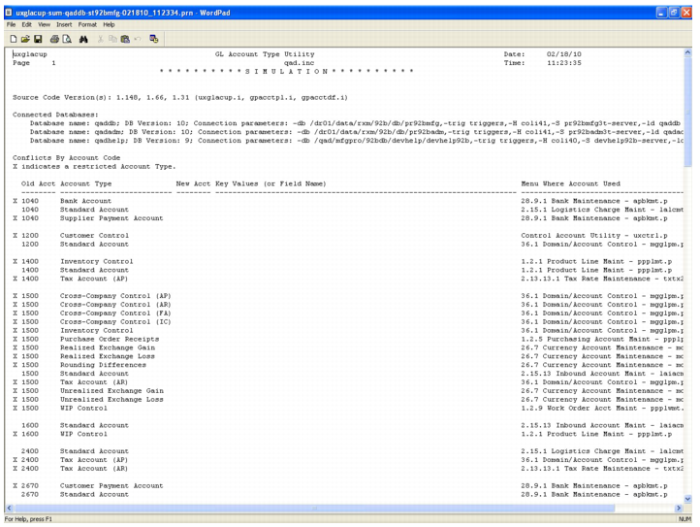
The following report uses account 1040 as an example.
GL Account Type Utility Output
The instances with an X must have a unique account code separate from the others.
It is not necessary to change each instance of account 1040 to a new account. Nor is it necessary to change every instance of account 1040 with an X to a new account.
The objective is for all three of these instances to have different accounts after the conflicts for 1040 are resolved. Any one of them can retain the original account 1040 as long as neither of the other two is assigned account 1040.
See
Expected Category by Account Type for the expected category for each Enterprise Edition account type.
Impact of GL Account Type Utility During a Conversion
The data entered in the GL Account Type Utility is used for two purposes during a conversion:
• If there was an account Type conflict before conversion, the data entered in the utility is used to set the Type of the GL Account in the Enterprise Edition Financials.
• A new account is created and assigned to the relevant fields where you have elected to replace an account with a new Account Code for a particular usage.