QAD 2017 Enterprise Edition
>
Installation-Conversion
>
Conversion Guide
>
GTM Conversions
>
Converting VAT Taxes to GTM
Converting VAT Taxes to GTM
This section describes conversion from the VAT system available in earlier versions to GTM. The VAT to GTM conversion translates VAT data to GTM equivalents and updates existing eB2.1 and later records.
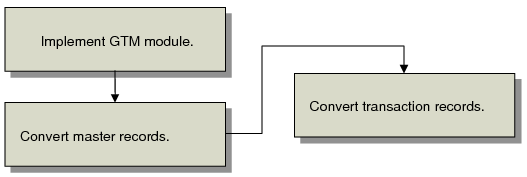
VAT to GTM Conversion Process summarizes the conversion workflow.
VAT to GTM Conversion Process
The workflow revolves around three sets of activities:
Implement GTM Module
Implementing GTM for VAT, you make planning decisions and then run a set up program. How this program works depends on whether a country is a member of the European Community.
Convert Master Records
Run a program that populates database tables for customer and supplier addresses, items, product lines, and other master records with GTM data values.
Convert Transaction Records
Run a second program that populates transaction records. All transactions subject to tax are affected, including sales, purchasing, accounts payable, accounts receivable, and service/support management.
Important: After each of these activities, review the corresponding reports and audit trails. Mistakes can be pervasive and costly.
eB2.1 and later Programs Used to Convert VAT to GTM lists the eB2.1 and later programs used during the conversion.
eB2.1 and later Programs Used to Convert VAT to GTM
Activity | eB2.1 and Later Programs |
Implementing GTM | Country Code Maintenance (2.14.1) VAT to GTM–Setup (2.13.22.1) |
Converting master records | VAT to GTM–Masters (2.13.22.2) |
Converting transaction records | VAT to GTM–Transactions (2.13.22.3) |