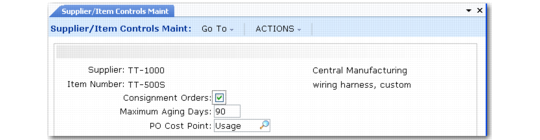
Create Supplier/Item Control Records
Use Supplier/Item Controls Maintenance (5.18.1) to define specific default values for suppliers or for combinations of suppliers and items. The values entered here override the settings in Supplier Consignment Control or Supplier Consignment Accounting Control only for the specified supplier. When new orders are created for a specific supplier, the system looks for the most specific record first to determine the defaults to use. Orders previously entered into the system remain unchanged.
Supplier/Item Controls Maintenance (5.18.1)
The settings in this program apply either to the supplier alone or to the supplier/item number combination specified in the header frame. Only the supplier is required.
Supplier
Enter a valid, active supplier code to identify this control record. This code represents the company that supplies consigned items.
This is a required field. Associated control values apply to this supplier only.
Item Number
Optionally enter an item number to use as part of the unique identifier for this control record. This item number represents the consigned item being received into inventory.
When you enter an item number, this control record applies to purchase order lines for this item only.
Items must be previously defined in Item Master Maintenance (1.4.1).
Leave this value blank to indicate that this control record applies to all items from this supplier without a specific control record.
Note: Do not specify a supplier item defined with Supplier Item Maintenance (1.19) in this field. When you specify a supplier item on an order line, the system converts it to the internal item before looking for defaults defined with this program.
PO Cost Point.
Specify which purchase order cost you want the system to use to calculate the purchase price variance. This is the cost at which the usage is paid/invoiced.
Usage: Use purchase order cost at time of usage.
Receipt: Use purchase order cost at time of physical receipt.
Initially, this field defaults from Supplier Consignment Accounting Control. The value you specify defaults to Purchase Order Maintenance. Each item record created for a particular supplier must have the same PO cost point.
When you try to change the value for a supplier/item combination and other records for that supplier exist, you are prompted to change the PO Cost Point value for all instances of that supplier in this program.
Important: Responding Yes updates the PO cost point for all records for the specified supplier including supplier/item combination records. No returns you to the PO Cost Point field and no updates are made.