Supplier Consignment Inventory
The Supplier Consignment Inventory module lets you plan, order, receive, stock, track, and report supplier-consigned inventory using an automated system that reconciles inventories between suppliers and customers. Receiver matching and accounts payable (AP) transactions are deferred until the inventory is used. Customer use includes transfer, shipping, manufacturing, or distribution to its own customers.
This chapter describes how to set up and manage consigned inventory. It also gives an overview of the reporting tools available for reviewing and tracking consignment activity.
Overview of Supplier Consignment InventoryIntroduces the Supplier Consignment Inventory module and describes many of its functions.
Planning and SetupDetails the setup and prerequisite data and processes necessary to use the module.
Managing Consigned InventoryLists and describes the key management functions of the module and illustrates how to create transaction history, order, receive, and use consigned inventory, make inventory adjustments, process returns, rejects, and corrections, track, and manage consigned and aged inventory.
Reporting Supplier Consignment Inventory DataDescribes the reports and inquiries that allow evaluation and management of accounts and inventory.
Overview of Supplier Consignment Inventory
The Supplier Consignment Inventory module lets you plan, order, receive, stock, track, and report supplier-consigned material while at the same time deferring receiver matching and accounts payable (AP) transactions. A company using consigned inventory pays for only what they use, not for what they receive.
The module extends the purchase order process by providing new transactions to receive material and identify it as consigned. These transactions also delay the standard AP process until material is consumed but allow the consigned items to be visible for planning. When items are consumed, such as in a manufacturing process, the receiver becomes available for receiver matching.
When consumption is reported back to the supplier, the supplier can transfer liability for the material in their system and issue an invoice if self-billing is not being used.
Using consigned inventory alleviates the need for the supplier to buy back the excess sent to the customer or remaining at the end of the consignment period. Because the supplier still owns the inventory, any excess is simply returned.
Using key features of Supplier Consignment Inventory, you can:
• Create PO consigned inventory and inventory offset accounts at the domain level, for product lines, or for combinations of sites and product lines.
• Delay the transfer of ownership of consigned inventory by deferring AP transactions until you use the inventory.
• Determine at the domain level whether consigned inventory should be consumed first or only after non-consigned inventory is exhausted.
• Set up consignment defaults for the majority of your purchase orders and supplier scheduled orders and tailor defaults for individual supplier addresses and items.
• Create supplier invoices for payment of shipping charges immediately, while delaying receiver matching for material until it is actually used.
• Indicate for selected sites and locations that inventory transfers should initiate a change in ownership.
• Determine the tax point for consigned inventory based on settings in the associated tax rate. The tax point can be either at receiver matching or consumption.
• Create a purchase order or scheduled order with both non-consigned and consigned items.
• Manually adjust consigned inventory if needed.
• Include or exclude consigned inventory during physical inventory or cycle count.
• Export EDI transmissions to inform suppliers of item usage, or create records to send manually.
• Retain visibility of consigned inventory information including its location, status, age, and order details.
• Manage and update aging dates.
• Generate reports and inquiries that sort and display details according to your needs:
• Identify unconsumed inventory that exceeds its maximum aging date.
• Compare inventory received with inventory consumed.
Supplier Consignment Inventory Business Workflow
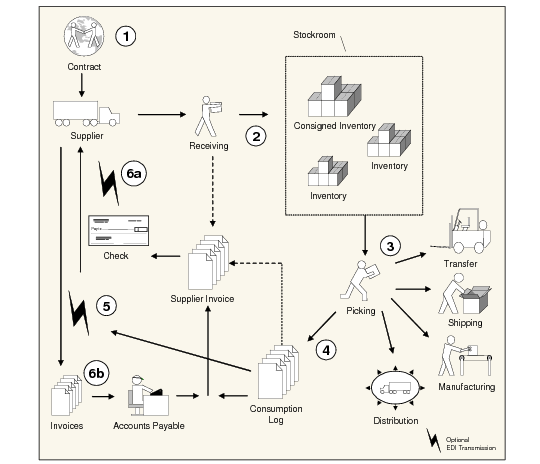
Figure 2.1 shows the complete consignment inventory workflow beginning with the contract and ending with accounts payable.
Consignment Inventory Business Flow
Creating a Purchase Order
A contract is created between a customer and a supplier that dictates the items to be sold on consignment (step 1 in
Consignment Inventory Business Flow). The contract is either a standard purchase order, a blanket purchase order, or a scheduled purchase order. It includes clauses on deferring liability. The contract may also include a maximum number of aging days that a customer is permitted to hold items without liability of payment. This ensures that inventory will be consumed in a timely manner.
Receiving Inventory
As consigned inventory arrives, it is handled by the standard receiving process (step 2 in
Consignment Inventory Business Flow). The inventory is immediately nettable to MRP and available for allocation according to the inventory status of the stock location.
Cumulative receipt quantities are automatically updated for scheduled purchase orders. Because the consigned inventory is not yet available for receiver matching, any supplier invoice process selecting open receipts bypasses receipts of consigned inventory until it is consumed.
Only shipping-related charges (trailer and freight) can be matched with the supplier invoice at the time of receipt.
Consuming the Inventory
The consigned inventory is eventually consumed by the customer (step 3 in
Consignment Inventory Business Flow). Consumption occurs in the following ways:
• Issues to a manufacturing order such as a work order, repetitive order, or flow schedule
• Unplanned issues
• Issues to a configured item final assembly order
• Transfers to another location within a site
• Shipment of consigned parts (sales order shipments or shipper confirm)
• Manual consumption of aged inventory
Consumption activity is logged (step 4 in
Consignment Inventory Business Flow) for audit purposes and for batch processing. When reported to the supplier (step 5 in
Consignment Inventory Business Flow), it triggers the transfer of liability. Consumption can be reported manually or using EDI eCommerce.
Once the inventory is consumed, the receiver is available for receiver matching, but only for the amount consumed. This can be a partial amount and may not always be the total amount on the receiver. The system tracks how much of the receiver is available for receiver matching. A cumulative quantity is kept to track the total material consumed on the contract.
Paying for the Inventory
Supplier Invoices are created either manually using functions in Accounts Payable (AP) or automatically by Evaluated Receipts Settlement (ERS). Both distinguish between receipt of consigned inventory that has been consumed and receipt of consigned inventory that has not been consumed; for example, when only a portion of an order has been consumed.
Because receiver matching follows standard processing, it is not discussed in this chapter.
See
QAD Financials User Guide for details on AP processing.
Using Supplier Consignment Inventory with EMT
Enterprise Material Transfer (EMT) lets you translate sales orders into purchase orders automatically and transmit those purchase orders to secondary business units (SBU) electronically using EDI eCommerce. By definition, the system creates all lines of EMT purchase orders as non-consigned. You cannot change the consignment setting on these system-maintained orders.
See
QAD Sales User Guide for information on EMT.
Supplier Consignment Programs
Supplier Consignment Inventory Programs lists programs included in Supplier Consignment Inventory.
Supplier Consignment Inventory Programs
Menu Number | Description | Program Name |
5.18 | Supplier Consignment Inventory... | |
5.18.1 | Supplier/Item Controls Maintenance | pocnvdmt.p |
5.18.2 | Supplier/Item Controls Browse | pobr014.p |
5.18.6 | Consignment Inventory Report | ppptrp10.p |
5.18.7 | Consignment Inventory By Order | pocnrp01.p |
5.18.8 | Consignment Usage Report | pocnrp02.p |
5.18.9 | Consignment Usage Summary Report | pocnrp03.p |
5.18.10 | Consignment Usage Export Report | pocnrp04.p |
5.18.13 | Aging Inventory Update | pocnaimt.p |
5.18.14 | Aging Inventory Batch Update | pocnaiup.p |
5.18.15 | Aging Inventory Report by Order | pocnairp.p |
5.18.16 | Aging Inventory Report by Part | pocnair1.p |
5.18.24 | Supplier Consignment Control | pocnspm.p |
5.18.25.1 | Consignment Inventory Adjustment | pocnadj.p |
36.9.4 | Supplier Consignment Accounting Control | fipocnsp.p |
Consignment Process Summary
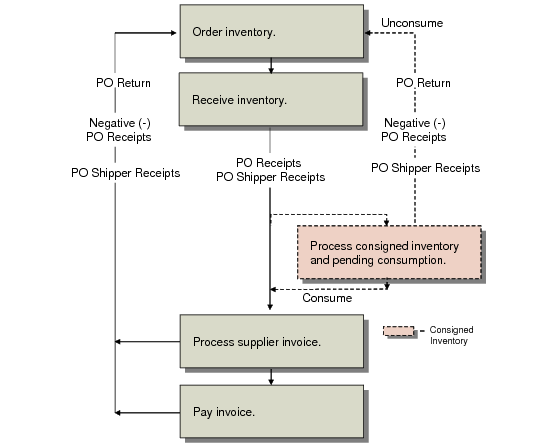
Figure 2.2 shows the sequence in which the Supplier Consignment Inventory module processes data.
Consignment Overview