Defining Performance Events
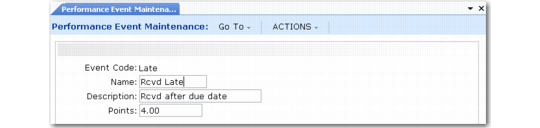
After setting up category definitions, create event definitions in Performance Event Maintenance (5.15.5). Events are actions—positive or negative—that the system records and uses as supplier performance data. Examples of events are on-time delivery, quality of items, undershipment, or overshipment.
Event points are used by the discrete computational method only. The proportional and parts-per computational methods use ratios to rate suppliers based on activity.
As events occur, points are awarded to the supplier. These events are termed system events because the system can automatically recognize and count them. You must create event definitions to use the data captured by the system events. The details from the event definitions you create are used to sort, calculate, and report on data captured by the corresponding system events.
Performance Event Maintenance (5.15.5)
You define the points corresponding to the events during setup. Once your system is active, it automatically recognizes the event, and the event definition indicates how to award point values. This reduces the amount of manual data entry needed during the normal business flow.
Events of a subjective nature are termed subjective events, since it takes a user decision to determine the event. These user-interpreted events are captured manually using the various Supplier Performance pop-up windows or using Performance Data Maintenance (5.15.13).
System events are negative events such as late shipment, overshipment, or duplicate ASNs. Subjective events can be positive, such as good phone support or sharing research costs. They can also be negative, such as wrong labeling or excess freight charges.
You can update the definition of both system and subjective events at any time. Changes take effect immediately.
Use Performance Event Browse (5.15.6) to view the event definitions you create using this program.