Supplier Performance
Overview of Supplier PerformanceIntroduces the Supplier Performance module and its features and workflow.
Setting Up Supplier PerformanceDetails the steps that must be taken to set up the module.
Collecting Performance DataDescribes how and where performance data is collected.
Reporting and Managing DataDetails the reporting, data consolidation, and delete/archive functions of the module.
Overview of Supplier Performance
The Supplier Performance module enables manufacturers to monitor the performance of their internal and external suppliers. Depending on your manufacturing environment, you can customize the way your system collects performance data as well as how you report performance metrics. You can create your own data collection points or use the ones predefined in the system.
This module provides flexible automatic and manual data collection. You can optionally record any nonroutine events or modify or add to any existing event with the maintenance functions. Finally, you can tailor performance reports—both internal and external—to meet your needs.
Note: Supplier Performance is an element of the QAD PRO/PLUS functionality. Other PRO/PLUS elements include:
Features
Flexible Registration
With the Supplier Performance module, you can enable or disable data collection for any registration. A registration in Supplier Performance is the record used to specify the supplier, site, item, corporate commodity code, date, or combination of these for which performance data is collected.
You can explicitly define when, where, and for what registration you want data to be collected. You can further define the data you want to collect by specifying a date or date range when the data collection should occur or be disabled.
Flexible Event/Category Definitions
This module gives you broad control of the performance activities you want to count, where you want to count them, and for which registration you want to collect data. You can use system events as measurements, or you can define the specific nonsystem events to be counted. Supplier Performance automatically collects data during the following transactions:
• Schedule Update from MRP (5.5.3.1)
• Purchase Order Receipts (5.13.1)
• PO Shipper Receipt (5.13.20)
• RTS Receipts (11.7.3.13)
• Distributed Order Receipt (12.15.20)
• Document Import (35.1)
Using category and event definitions, tell the system what data you want reported, and how you want that data to be reported. Although the system has predefined categories and events, you must create corresponding category and event definitions. Your category and event definitions tell the system how much each system category and event is worth, whether to report data for that event or category, and how to report that data.
Use Performance Category Maintenance (5.15.1) and Performance Event Maintenance (5.15.5) to create category and event definitions for each system category and event. Use System Category/Event Maint (5.15.22) to link system categories and events with the category and event definitions you create.
When you create category and event definitions, you can specify if you want optional data collection to occur during the following system transactions:
• Inventory Transfers
• Transfer–Single Item (3.4.1)
• Transfer–Multi Item (3.4.2)
• Transfer with Lot/Serial Change (3.4.3)
• Batchload Transfer with Lot/Serial Change (3.4.4)
• Purchase Order Returns (5.13.7)
• RTS Shipments (11.7.3.16)
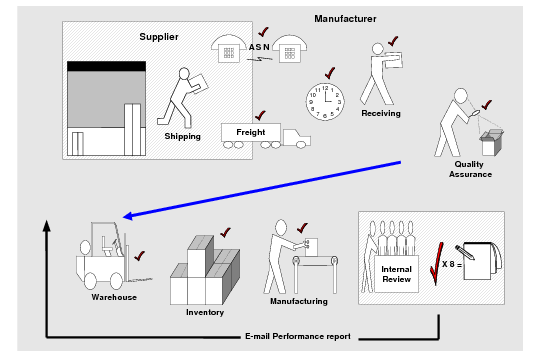
Sample Supplier Performance Data Collection Points shows some events you can track. You can create nonsystem event definitions that you can manually enter into the system. For example, you can define events to track supplier performance by:
• Freight type or cost
• Product quality
• Service quality
• On-time scheduled-order delivery
Sample Supplier Performance Data Collection Points
Multiple Rating Systems
Supplier Performance offers three performance calculation and rating methods.
Discrete method
Counts points associated with each performance event; for example, 100 points earned for 100 on-time deliveries.
Proportional method
Assigns a percentage rating based on the actual number of satisfactory events completed divided by the total possible number of events.
Parts-per method
Similar to the proportional method, but uses a large factoring number to assign a rating.
You are not limited to using only one method in your system. Apply any method to each of the registrations you are tracking.
Supplier Performance Workflow
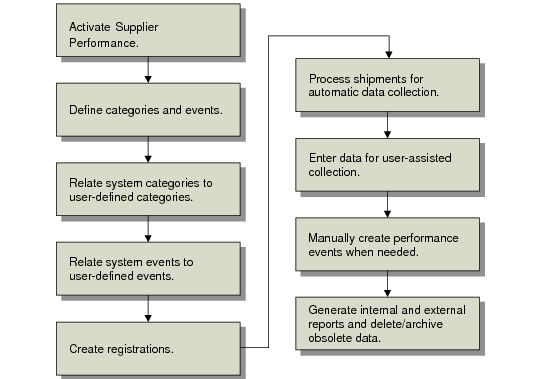
Supplier Performance Workflow shows a typical Supplier Performance workflow.
Supplier Performance Workflow
Supplier Performance Programs
The Supplier Performance module uses the programs listed in
Supplier Performance Programs.
Supplier Performance Programs
Menu Number | Description | Program Name |
5.15.1 | Performance Category Maintenance | povecmt.p |
5.15.2 | Performance Category Browse | pobr026.p |
5.15.3 | Supplier/Category Maintenance | povescmt.p |
5.15.4 | Supplier/Category Browse | pobr023.p |
5.15.5 | Performance Event Maintenance | poveemt.p |
5.15.6 | Performance Event Browse | pobr024.p |
5.15.7 | Performance Weight Factor Maint | povewmt.p |
5.15.8 | Performance Weight Factor Browse | pobr025.p |
5.15.10 | Registration Maintenance | povesimt.p |
5.15.11 | Registration Report | povesirp.p |
5.15.13 | Performance Data Maintenance | povepmt.p |
5.15.14 | Performance Data Report | povedrp.p |
5.15.38 | Performance Data Report | .NET UI only |
5.15.15 | Performance Report Card | povedrp2.p |
5.15.17 | Missed Shipment Event Generator | povemsrq.p |
5.15.19 | Summary Data Extract | povesmex.p |
5.15.20 | Summary Data Report | povesmrp.p |
5.15.22 | System Category/Event Maint | poveecmt.p |
5.15.23 | Delete/Archive Menu ... | |
5.15.23.1 | Performance Data Delete/Archive | poveup.p |
5.15.23.2 | Summary Data Delete/Archive | povesup.p |
5.15.23.3 | Supplier Cross-Reference Maint | povexmt.p |
5.15.23.4 | Supplier Cross-Reference Report | povexrp.p |
5.15.23.5 | PO Supplier Cross-Reference Browse | pobr034.p |
5.15.23.6 | DO Cross-Reference Browse | dobr002.p |
5.15.24 | Supplier Performance Control | povepm.p |
Supplier Performance Program Types
The Supplier Performance module consists of four program types:
• Setup programs
• Registration programs
• Data collection and maintenance programs
• Reports and inquiries
Each step of the supplier performance process is detailed in the following sections.