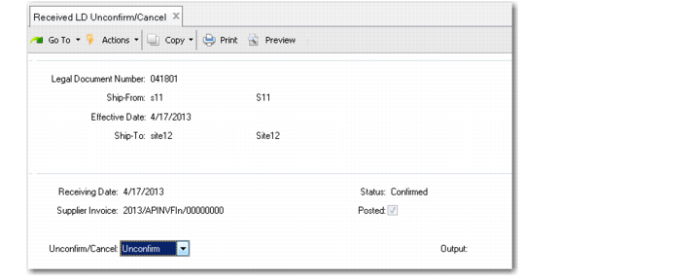
Unconfirm or Cancel Received Legal Document
Use Received LD Unconfirm/Cancel (5.20.23) to unconfirm or cancel a received legal document.
Unconfirm
The system sets the legal document status from Confirmed back to Open and deletes any associated pending supplier invoice. Use this method when you need to modify the original confirmed fiscal document for some reason; for example, to correct fiscal data, item details, price, tax, or other incorrect information. After making the changes, reconfirm the legal document and send it to AP using ERS if it is a standard PO receiving transaction. The legal document number remains the same.
If the legal document has already been posted to AP by the ERS processor (Posted is Yes), you must manually reverse the related supplier invoice in the Financials module before unconfirming the legal document.
Cancel
The system cancels the legal document. Use this method when you want to discard the previous received legal document, which might be an entirely wrong one. You then start a new transaction from scratch. The canceled legal document number cannot be reused, and the canceled document can no longer be printed. (For historical purposes, canceled legal documents are still visible to some reporting and browse functions.)
There are two preconditions before you can cancel an inbound legal document:
• The legal document must in Open status, which means that to cancel a legal document you must reverse the supplier invoice and unconfirm the legal document if the confirm/post has already been done.
• The previous physical receiving transactions must be reversed first by using return functions.
Special Cases
• Non-purchase receiving transactions. It is possible to unconfirm/cancel such transactions. However, if the original legal document has been posted with taxes, you must reverse the posted taxes before unconfirming or canceling the document.
• PO receipt has been done with both fiscal and physical receiving, related AP has been posted, and a PO return creates an issuing legal document linking to the original legal document. In this case, the system assumes that goods were received and then returned to the supplier (partially or not). The legal document cannot be canceled because it is considered to represent a completed receiving action. The physical quantity cannot be reverted as the PO was reopened. If you want to cancel any legal document that involves a return, cancel the PO return first, and then you can cancel the legal document.
Program Fields
Received LD Unconfirm/Cancel (5.20.23)
Legal Document Number
Enter the number of the received legal document that you want to unconfirm or cancel.
Ship-From
Enter the ship-from address of the supplier associated with the selected legal document.
Effective Date
Enter the effective date of the specified legal document.
The default is the receiving date.
Ship-To
The system displays the ship-to address from the purchase order. You cannot update this field.
Receiving Date
The system displays the date when physical receiving took place. It must be exactly the same as the effective date of the receiver. You cannot update this field.
Status
The system displays the status of the received legal document. You cannot update this field.
The status determines which action you can take with this received legal document:
Confirmed: You can unconfirm the legal document, but not cancel it until it is unconfirmed.
Open: You can cancel the legal document, but not unconfirm it.
Supplier Invoice
If the invoice has been posted, the system displays the supplier invoice number. You cannot update this field.
Posted
The system displays the posting status of the supplier invoice associated with the legal document.
Yes: The associated supplier invoice has been created/posted to AP by running ERS. The system displays the invoice number.
No: A supplier invoice has not been posted in AP. (Either ERS has not been run yet or it is a non-purchase receiving activity.)
You cannot update this field.
Unconfirm/Cancel
Specify which action to take for the selected received legal document:
Unconfirm (default): The system changes the status of the document from Confirmed back to Open.
Cancel: The system discards the received legal document. The document can no longer be printed, and the legal document number cannot be reused.