QAD 2017 Enterprise Edition > User Guides > Purchasing > Legal Documents > Legal Documents Overview > Legal Documents Menu Listing
  
Legal Documents Menu Listing
Legal Documents Programs lists the functions available for setting up and using the legal documents features.

Legal Documents Programs
 
 
Number
Menu Label
Program
7.10.2
Legal Document Report
soldrpt.p
7.10.3
Legal Document Browse
ldbr001.p
7.10.4
Legal Document Print
gpldprt.p
7.10.9
Stock Card by Location
soldstcl.p
7.10.10
Stock Card with Cost
soldstcc.p
7.10.11
Stock Card
soldstcd.p
7.10.13
Simultaneous Operation Maint
soldopmt.p
7.10.23
Legal Document Delete/Archive
gpdaldis.p
7.10.24
Legal Document Control
soldpm.p
5.20.1
Fiscal Receiving
poldnfmt.p
5.20.24
Received Legal Document Control
poldpm.p
5.20.4
Received Legal Document Report
soldrcrp.p
Most legal documents functions are grouped under the Legal Documents Menu (7.10), while other functions specific to received legal documents are grouped under the Received Legal Documents Menu (5.20). However, some legal documents fields and options are scattered among other related functions.
Fiscal Receiving
Use Fiscal Receiving (5.20.1) to process the recording and the confirmation of received fiscal documents (legal documents). Fiscal Receiving supports scenarios where it is necessary to use a legal document as an invoice. Fiscal Receiving lets you:
Record fiscal document information effectively, such as item numbers, quantities, costs, and taxes from shipping documents.
Process verification of the physical amount against the amount described on the fiscal document.
The verification process is regarded as a receiver-matching process performed in the operational module; thus, Fiscal Receiving is used to partially automate the processing of supplier payments in the financial module.
Important: If Fiscal Receiving is enabled, Fiscal Receiving becomes mandatory for the standard receiving process. You must perform both the physical and fiscal receiving, and successfully go through the confirmation process to complete the receiving.
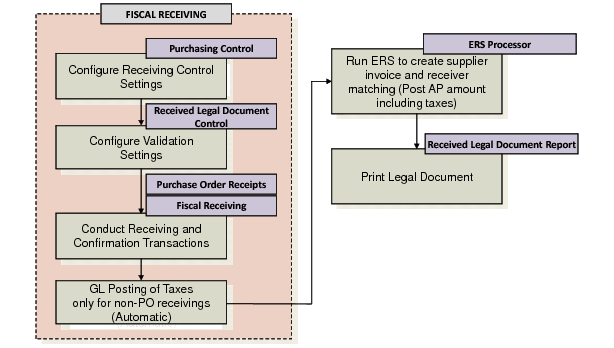
The general receiving steps are depicted in the following figure.

Receiving Process of Legal Documents
Note: In a normal receiving process, you only perform physical receiving to have the pending supplier invoice created. However, in a fiscal receiving process, pending supplier invoice is created only after both the physical and the fiscal receiving are completed.