QAD 2017 Enterprise Edition
>
User Guides
>
Purchasing
>
Purchasing
>
Creating Blanket Orders
Creating Blanket Orders
Blanket orders save time when placing periodic or recurring orders for the same item because they let you preapprove purchase orders. Blanket orders are templates for purchase orders. You cannot receive items against them and MRP does not include them as supply.
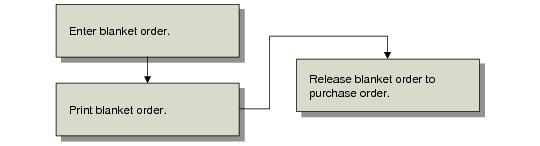
Blanket Order Flow
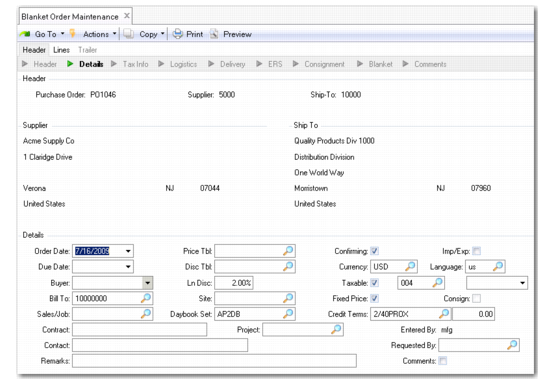
Use Blanket Order Maintenance (5.3.1) to record and modify blanket orders.
Blanket Order Maintenance (5.3.1)
You can create blanket orders for two types of deliveries:
• Recurring. Deliveries are regular, recurring, and of the same size. In the order header, set Recurring and Release to Yes. For deliveries that take place on a regular cycle, such as weekly or monthly, specify a cycle code. Set up values in Generalized Codes Maintenance (36.2.13) for field po_cycl to standardize input. You do not have to specify order and line item due dates during order entry. Leave these fields blank to have the system assign them automatically when the blanket order is released. Set Quantity to Release to the normal delivery size.
• Irregular. Delivery dates or item quantities vary with each PO. In the order header, set Recurring and Release to No. To release an irregular blanket order to a purchase order, set Release to Yes and enter the delivery due date and order quantity for each item.
The daybook set is used to number supplier invoices that originate from this blanket order. The default daybook set is copied from the supplier record in Supplier Data Maintenance (2.3.1), but you can overwrite it with a new value. See
QAD Financials User Guide for further information on daybook sets.
Release the blanket order in Blanket Order Release to PO (5.3.6). You can set selection criteria for any combination of cycle code, order number, supplier, blanket order date, or due date. The system assigns a PO number by appending a release number to the blanket order number. For example, the first purchase order for blanket order 12004 would be 1200401, the second would be 1200402, and so on. If the appended number would exceed eight characters, the system assigns a new number. The ID of the user performing the release is recorded in the Entered By field. A report is produced of the orders successfully released to POs.
If you release an item by mistake, use Purchase Order Maintenance (5.7) to cancel or delete the line. When a purchase order line item is canceled or deleted, the open quantity on the corresponding blanket PO is automatically adjusted. You can also use Purchase Order Maintenance to change the site or quantity ordered for a line item on a released PO. The quantity open on the blanket order is automatically adjusted. The PO quantity cannot exceed the open line item quantity on the blanket order. Changing the delivery site on the PO does not update the blanket order. You cannot delete a PO line item or change its site or quantity when receipts are posted against it.
When a receipt is posted against a PO released from a blanket PO, the corresponding blanket order receipt quantity (if any) is also updated. The system closes blanket orders when the order is fully released or when all the lines are closed or canceled.
To delete or archive closed blanket orders, use Closed PO Delete/Archive (5.23). You cannot delete a blanket order when purchase orders created from it exist in the system.