Purchasing
Purchasing provides comprehensive support for procuring components, materials, and supplies in a centralized or distributed environment.
Introduction to PurchasingExplains purchasing and the impact it has on products, ordering, and receiving materials and services, and lists types of purchase orders.
Creating Purchase OrdersDescribes how to use Purchase Order Maintenance to create a purchase order in three sections.
Updating Purchase Order CostsExplains how Purchase Order Update is used.
Using Temporary Pricing for Purchase OrdersDescribes how to set up and use temporary prices for purchase orders and supplier scheduled orders.
Creating Blanket OrdersExplains why blanket orders are effective in certain situations and the types of deliveries for which blanket orders can be created.
Creating ReceiversOutlines the process of creating receipts and their control settings, history records, shipment and subcontract information, PO receipt packing slip inquiry, PO containers and shippers with and without invoices, and PO fiscal receiving.
Creating ReturnsIllustrates how goods can be returned to a supplier.
Deleting Expired OrdersOutlines four programs that allow expired orders to be deleted.
Calculating Purchase Price VariancesLists and describes the two types of variances that can be calculated when purchasing materials.
Subcontract PurchasingDescribes how subcontract services can be set up and monitored as well as illustrating specific subcontractor functions.
Special Purchasing TopicsCovers multisite purchasing, purchasing memo items, and purchasing miscellaneous items.
Introduction to Purchasing
Purchasing lets you manage all aspects of ordering and receiving materials and services—requisitions, approvals, purchase orders, receipts, and returns. It supports purchasing of products as well as non-product materials and services—such as subcontracting services—and gives you the means to support discrete, process, and just-in-time (JIT) manufacturing.
Effect of Optional Features
A number of optional features and modules affect the processing of purchase orders and PO receipts. Many of these options add additional pop-up windows that display during header or line-item entry. This chapter describes standard purchase orders. If you are using optional features, the following list indicates where you can find additional information when:
• If you are using the optional Enterprise Material Transfer (EMT) module, EMT automatically translates sales orders into purchase orders, which cannot be processed using standard purchase order features. EMT is described in
QAD Sales User Guide.
• If you are using purchase orders to manage subcontract receipts and are also using the WIP Lot/Trace module, additional pop-ups display. These are described in
QAD Manufacturing User Guide.
Purchasing
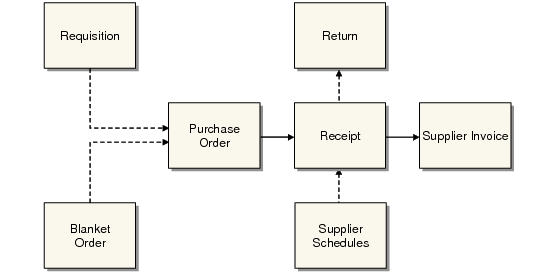
A purchase involves several steps. Often the first step is a requisition, which is the result of demands recognized by material requirements planning (MRP) or entered manually. An order is next, either a purchase order, a blanket order, or a supplier schedule. When the ordered goods arrive, a record is made called a receiver. If the goods are returned to the supplier, another record is made. The system keeps a record of each step.
Overview of Purchasing Activities
Requisitions
A requisition is a record stating that an item is needed. Requisitions specify quantity, date needed, and place to be delivered. A requisition is often the first step of a purchase, although you can issue a purchase order without it. Create requisitions manually or by approving a planned order from MRP. Some companies also require approvals before requisitions become orders. The requisition’s information is then transferred to a purchase order or a blanket order, and the requisition is deleted.
Purchase Orders
A purchase order is a contract with a supplier for items to be delivered on specified dates. It includes the delivery address, the terms of the agreement, tax data, and shipping costs.
Receivers and Supplier Invoices
A receiver is a record that goods have been received into inventory. Receivers update inventory balances and allow accounts payable to verify quantities and prices before paying suppliers.
As items are received into inventory, an invoice for the items is typically received in accounts payable. Information from the invoice is recorded in the system. After verifying that no discrepancies exist among the supplier invoice, the purchase order, and the receiver, accounts payable approves the invoice for payment.
Optionally, use Evaluated Receipts Settlement (ERS) to record a pending payment to a supplier without an invoice.
Returns
A return is a record of purchased items returned to a supplier. If items are returned for exchange, a return transaction tracks the items. If they are returned for credit, a purchase order with a negative quantity adjusts supplier balances.
Types of Purchase Orders
The system supports three kinds of purchase orders:
• Discrete purchase orders
• Blanket purchase orders
• Supplier schedules
Discrete Purchase Orders
Use discrete POs for single transactions with a supplier, when there is no assumption that further transactions will occur. Purchase orders contain a single delivery date for each line item. MRP treats purchase order items as supply, and assumes that ordered amounts will be available on the delivery date. Receipts can be processed against these purchase orders.
Blanket Orders
Use blanket POs for multiple deliveries of stock items, where an ongoing relationship with the supplier is assumed, but exact delivery dates are yet to be determined. Quantities and due dates can be entered up to the time when a blanket order becomes a purchase order.
MRP ignores blanket orders, and receipts cannot be processed against them.
The system uses the blanket order as a template to create a purchase order when a release is made. However, once a blanket order is released, the resulting purchase order is treated like any other. Blanket orders can be released at specified intervals.
Example: A manufacturer of circuit boards buys solder at irregular intervals, but always from the same supplier. A blanket order for 12 months is created. Each month an order for solder is released to the supplier, each order specifying a particular quantity.
Supplier Schedules
A supplier schedule is an agreement with a supplier that guarantees a specified order level. Supplier schedules specify dates and even hours of delivery for the near term, and inform MRP and the supplier about long-term plans.
The header and trailer of a supplier schedule resemble those of a discrete purchase order for a single line item with multiple delivery dates. However, the line item section of a supplier schedule has two parts:
• A short-term shipping schedule with exact quantities and delivery instructions
• A long-term planning schedule showing upcoming orders and authorizing the supplier to buy raw materials or make subassemblies
See
QAD Scheduled Order Management User Guide for more information on supplier schedules.
Note: Standard supplier schedules support a single schedule that combines short- and long-term requirements. If you are using the Supplier Shipping Schedules module, you can generate separate planning and shipping schedules.
Items listed in supplier schedules are seen by MRP as supply, and receipts can be processed against them. Supplier schedules are also used for multiple orders from a supplier who may need to adjust production to accommodate the orders. For ongoing, irregular demands, use a blanket purchase order.
Example: A manufacturer of circuit boards needs circuit board blanks supplied each week. The manufacturer knows its exact needs for the next four weeks and its approximate needs for the next 12 months. The supplier of the blanks uses the information in the supplier schedule to plan orders for raw materials and to plan production and deliveries.