QAD 2017 Enterprise Edition
>
User Guides
>
Purchasing
>
Purchasing
>
Creating Receivers
Creating Receivers
Record receipts against purchase orders, supplier schedules, and shippers in Purchase Order Receipts (5.13.1). More than one line item can be processed in a single transaction. You can correct errors made in receiving by entering negative quantities in Purchase Order Receipts. However, you may have to reopen a purchase order line to do this.
You cannot create receipts when the transaction date is outside the order line effective date range for the order line being received. If you try, the system displays a warning. You can return items, but a warning displays when the transaction date is outside of the order line effective date range, and you are prompted to continue.
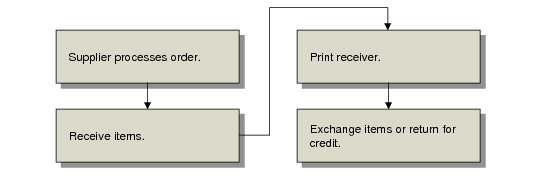
Receiving Flow
Control Settings
Several settings in Purchasing Control (5.24) affect purchase receipts.
• The Receiver Type field determines whether receivers are created for each order or for each item on the order, or not printed at all.
• Tolerance Percent and Tolerance Cost determine how the system manages receipts that exceed the order quantity.
History Records
When recording a receipt, the system updates several kinds of history records:
• Purchase receipts
• Inventory transactions
• Inventory GL costs
• Tax transactions
These records are used for accounts payable, variance reporting, tax reporting, and supplier performance reports. If you receive more than one delivery from a supplier on the same day for the same order, enter separate receipts to simplify receiver matching in accounts payable.
Shipment Information
If Shipment Info for Receipts is Yes in Container/Shipper Control (7.9.24), you can specify additional shipment information during receipt entry. A Shipment Information frame displays for input of data in:
• PO Shipper Receipt (5.5.5.11, 5.13.20)
• Purchase Order Receipts (5.13.1)
Subcontract Information
You can specify additional subcontract information and transact additional subcontract operations if you have control options set in the Advanced Repetitive module. In PO Shipper Maintenance (5.5.5.5 and 5.13.14) and Purchase Order Receipts (5.13.1), the Subcontract Shippers frame displays when you set Manual Shipper Update to Yes in Subcontract Shipping Control (18.22.5.24) in the Advanced Repetitive module. In the Subcontract Shippers frame, you can connect subcontract shippers and other subcontract data with the purchase order you are receiving items against, thereby allowing more subcontract operation visibility.
Additionally, if you use the WIP Lot/Trace function, you can use Purchase Order Receipts to place received WIP lot- or serial-controlled subcontractor items into finished goods automatically. To do this, you must set Move to Next Operation to Yes.
When the subcontract operation is the last routing operation, the system displays an additional frame to edit received WIP lot- or serial-controlled item information before an inventory record is created.
PO Receipt Packing Slip Inquiry
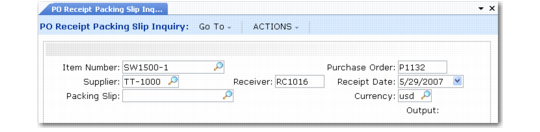
PO Receipt Packing Slip Inquiry (5.13.4) lets you review information by packing slip number and PO receipt number. Select records using one or more of the following selection criteria:
• Item number
• Purchase order
• Receiver
• Packing slip number
You can reconcile shipments by matching the supplier’s packing slip number or fiscal document number against your PO receipt. This is useful for supplier schedules and fiscal receiving.
PO Receipt Packing Slip Inquiry (5.13.4)