Update Control Settings
Use two programs to define domain-level controls, as well as to establish default values for managing consignment functions:
• In Supplier Consignment Control (5.18.24), activate the Supplier Consignment Inventory module and define other operational control values.
• In Supplier Consignment Accounting Control (36.9.4), specify operational settings that have an impact on financial activities, such as the PO cost point.
All values default to Supplier/Item Controls Maintenance (5.18.1) where you can modify them for specific combinations of suppliers and items.
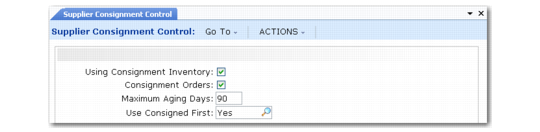
Supplier Consignment Control (5.18.24)
Using Consignment Inventory
This is the single place where you can activate the Supplier Consignment Inventory module. The default is No.
No: Enter No to display standard purchase order programs. The system bypasses all consignment screens.
Yes: The Supplier Consignment Inventory module is active. You can use Supplier Consignment Inventory programs.
Once you have activated the module, created consigned items, or performed transactions, entering No to deactivate the module displays a warning message. Unless all consigned items are consumed, the system warns you that non-invoiced consigned items exist and prompts you to confirm your action.
Consignment Orders
Specify the default value for the Consignment Orders field in the header of new purchase orders, scheduled orders, and blanket purchase orders:
No: Enter No if most of your inventory transactions are for non‑consigned items.
Yes: The Consignment Orders field on the header of new orders is Yes.
In either case, you can combine lines for both consigned and non-consigned inventory on one order.
Note: The value defined here is used on new orders only if the system does not find a more specific match in Supplier/Item Controls Maintenance.
Maximum Aging Days
Enter the maximum number of days consigned inventory is allowed to reside at your facility.
The default value is 0 (zero), which indicates no scheduled aging deadline exists. See
Managing Aged Inventory.
Use Consigned First
When Supplier Consignment is enabled, this value determines which inventory is processed first.
Yes: Use consigned inventory first.
No (default): Use non-consigned inventory first, letting the system select inventory based on the picking logic specified in Inventory Control. See
QAD Master Data User Guide for details.
The system checks this setting during various usage transactions, such as when items are issued to a manufacturing order, distribution order, or sales order. It also affects cycle count adjustments created by Cycle Count Results Entry.
This field is associated with reversal functionality when Supplier Consignment is enabled. When a negative quantity is issued, if the field is Yes, the system checks for usage records. When it is No, the system only checks for owned material when processing the negative quantity issue.
Supplier Consignment Accounting Control (36.9.4)
Transfer Ownership
Specify Issue/Backflush. Transfer of ownership (consumption) is allowed only at the time items are issued or backflushed. No other value is currently supported.
PO Cost Point.
Specify which purchase order cost you want the system to use to calculate the purchase price variance. This is the cost at which the usage is paid/invoiced.
Usage: Use purchase order cost at time of usage.
Receipt: Use purchase order cost at time of physical receipt.
The value in this field defaults to Supplier/Item Controls Maintenance. When no record for a supplier exists, the field defaults to PO Maintenance (5.7).