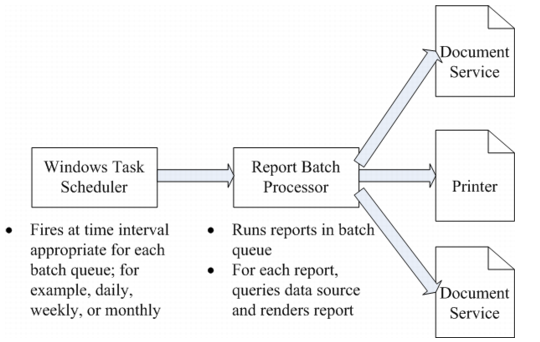
QAD Report Server Architecture
Reports can also be run on the report server. In this operational mode, the report render engine is run as part of a batch process that runs on the server. Reports in a batch are generated periodically during each batch run, such as in a daily, weekly, or monthly batch. Typically, you use the Windows Task Scheduler on the server to periodically fire off the running of a batch through a command line.
Any report run from the server can be sent to the printer of your choice, or an output file, typically a PDF file, that is stored on the QAD .NET UI web server, which can be accessed from a URL. Optionally, you can have the system send you an e-mail notification every time a report is run.
QAD Reporting Framework Architecture
You can have any number of Windows report servers that can process report batches. If you have a batch with a lot of reports in it that runs frequently, you can have several servers pointing to the batch, which balances the processing load as well as serves as a fail-safe redundancy.