Revenue Recognition Rule Menu
Use the Revenue Recognition Rule menu (37.2) to create revenue recognition rules.
Revenue Recognition Rule Create
The fields displayed depend on the rule type that you select.
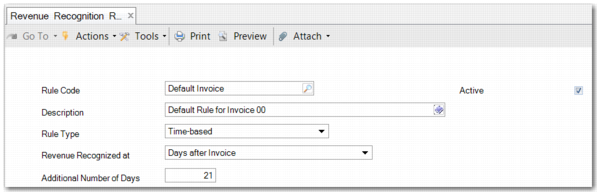
Revenue Recognition Rule Create displays the screen when you select a time-based rule.
Rule Code
Enter a meaningful rule code to identify the rule.
Description
Enter a meaningful description that explains the purpose of the rule.
Active
Only active rules can be assigned to active revenue recognition contracts. This field is selected by default.
Rule Type
Select a rule type. You can choose from Acceptance, Payment, Percentage Complete, Time-based, Periodic, or Custom Periodic. For the Payment and Percentage Complete rule types, no further setup is required. However, when you choose another rule type, extra fields are displayed.
Revenue Recognized at
This field is displayed for time-based rules. Choose from Days after Invoice and Days after Shipment. This field enables you to set the revenue recognition criteria to be a set number of days after the sales order line has been invoiced or shipped.
Additional Number of Days
This field is displayed for time-based rules. The field specifies the number of days after the invoicing or shipping—depending on the setting of the Revenue Recognized at field—that the revenue can be recognized.
Proof of Delivery
This field is displayed for rules based on customer acceptance. The field indicates whether a proof-of-delivery number is required to be recorded for an invoice to be flagged as accepted.
Note: When Proof of Delivery is selected, more fields become available for all invoice sub-records against the linked lines of the performance obligations. You can then flag an invoice as accepted and add the proof-of-delivery number when required.
Period Type
This field is displayed for periodic or custom periodic based rules. Select the length of the period type. Choose from Annually, Bi-annually, Quarterly, Monthly, or GL Period. By default, the type is GL Period.
Recognition Point
This field is displayed for periodic or custom periodic based rules. Choose to recognize revenue at End of Period, Offset, or Start of Period. By default, the recognition point is at the start of the period. If you select Offset, the Number of Days field is displayed. Use it to specify the offset from the start of the period when the revenue is recognized.
Number of Days
This field is displayed when you select Offset in the Recognition Point field. Enter the number of days from the start of the specified period when the revenue is to be recognized. A warning is displayed when the number of days you enter exceeds the length of the period type defined for the revenue recognition rule.
Revenue Recognition Rule Modify (37.2.2) enables you to modify a rule already in use in the system. However, you can only modify certain fields because the rule has previously been agreed upon with the customer.