Mapping Revenue GL Accounts
You can specify different GL accounts for revenue recognition deferral and accrual postings, depending on the sales account. This functionality enables you to separate the revenue recognition postings according to the needs of your organization—by product line, for example. You can map the sales account and a related deferred revenue account and accrued revenue account to the relevant GL accounts using Revenue GL Account Mapping (37.4). You must map each of these accounts to a separate GL account.
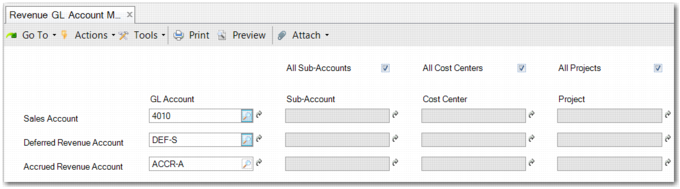
The simplest type of mapping maps a sales account to a pair of GL accounts for all analysis types; all sub-accounts, cost centers, and projects. This scenario is displayed in
Simple Revenue GL Account Mapping.
Any sub-account, cost center, and project analysis used on the sales account posting line is then copied and used for the deferred or accrued revenue account posting lines, provided such analysis can be used with those accounts. This depends on the analysis setup of the GL accounts.
Simple Revenue GL Account Mapping
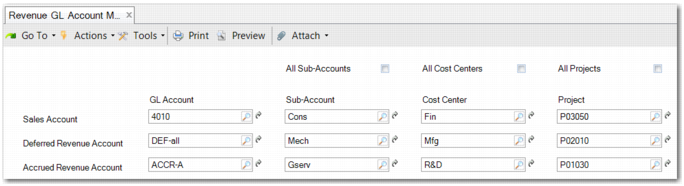
The most complex type of mapping maps a specific sales account, sub-account, cost center, and project combination to a pair of revenue recognition GL accounts. The deferred revenue and accrued revenue account each use a specific sub-account, cost center, and project combination. This scenario is displayed in
Revenue GL Account Mapping.
Revenue GL Account Mapping
A mapping must conform to how a GL account has been set up to handle analysis. For example, in one scenario, a mapping is created to not map all sub-accounts, cost centers, and projects. However, a deferred revenue account is set up to only use sub-account analysis. In this case, you are only permitted to enter a sub-account. The cost center and project fields for the account are disabled.
In another scenario, a mapping uses a sales account with no analysis. It is set to map all sub-accounts, cost centers, and projects to the deferred and accrued revenue accounts. However, the deferred and accrued revenue accounts are set up to use analysis.
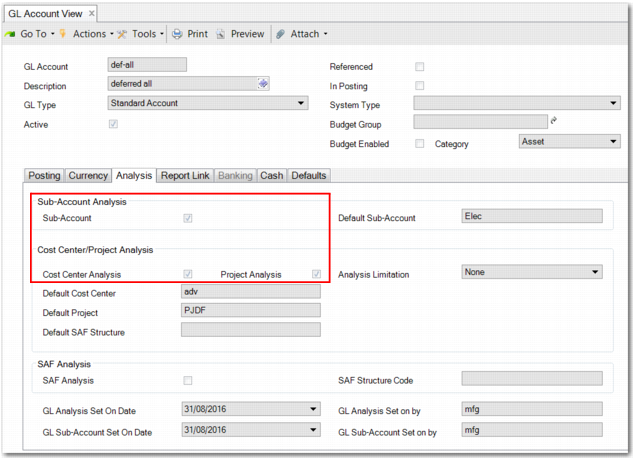
GL Account Create displays the deferred revenue GL account setup. In this case, there are no sub-accounts, cost centers, and project codes on the posting line for the sales account to copy over to deferred and accrued revenue posting lines. Therefore, the deferred and accrued revenue accounts must be set up to have default values. Otherwise, you cannot save the mapping and an error message is displayed.
GL Account Create