Revenue Recognition Autonumbers
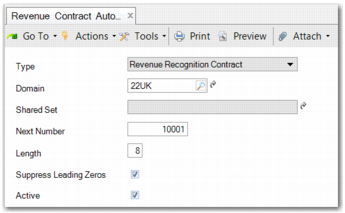
You can use Revenue Contract Autonumber Activate (37.1.50.1) to set up autonumbering for revenue contracts. The system generates a number for each newly created contract, based on the autonumbering you set up here. At this point, you can still override the generated number because the contract number is fixed only when the first version of the contract is saved to the database.
Revenue Contract Autonumber Activate
Enter the relevant details to set up autonumbering.
Domain
Enter the domain in which the autonumbering is to apply.
Next Number
Type a starting number for the revenue contract numbering. Each subsequent number will increment by one.
Length
Enter the length of the number. By default, the length is 8 digits.
Suppress Leading Zeros
When the number is less than 8 digits, you can select whether to suppress the leading zeros in the contract number.
Active
Select this field to make the autonumbering active.
The Revenue Contract Autonumber menu also contains the following programs:
• Revenue Contract Autonumber Modify (37.1.50.2)
• Revenue Contract Autonumber View (37.1.50.3)
• Revenue Contract Autonumber Deactivate (37.1.50.4)