Review Tab
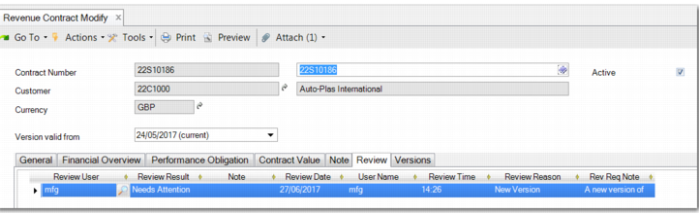
The Review tab allows you to create records that document the review of the revenue contract. The review process is an important feature during the lifetime of the revenue contract. The review record contains the following fields in form view, which you can open by double-clicking the review line.
Revenue Contract Modify – Review Tab
Review Date
This field contains the date the review was created and carried out.
Review Time
This field displays the time that the review was created and carried out.
Review User ID
This field displays the ID of the user carrying out the review.
Review User Name
This field displays the reviewer user name.
Review Reason
This field contains the reason for the review being required. The reason is taken from the Contract Version section of the General tab.
Review Request Note
This field contains the review request note. This information is taken from the Contract Version section of the General tab.
Review Result
This field contains the outcome of the review.
Notes
Enter any general notes that support the outcome of the review.
When you create a review, you must select one of two review outcomes:
• Approved
• Needs Attention
If you select Approved, the Review Required flag is removed on the General tab and the revenue calculation program can then create revenue recognition transactions. If you select Needs Attention, the Review Required flag remains selected and the revenue contract remains excluded from processing by the revenue calculation program.
For more information on the review process, see
Reviewing Revenue Contracts.