Manually Creating and Maintaining Revenue Contracts
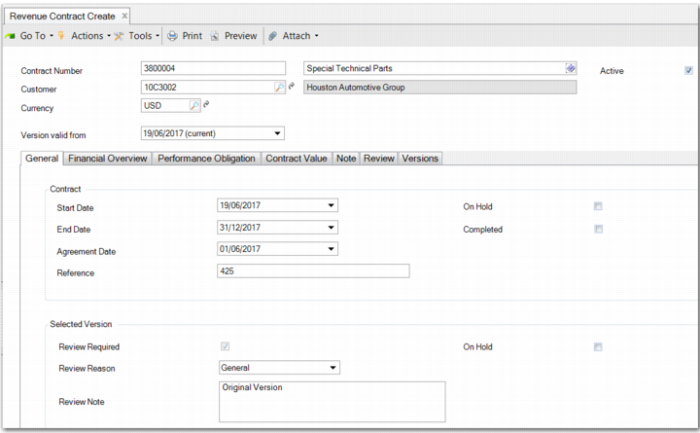
The Revenue Contract Menu (37.1) enables you to manually create and maintain revenue contracts, as displayed in
Revenue Contract Create. When you set up the system to automatically generate contracts, you can use this menu to maintain these contracts. The header fields store key revenue contract information.
Revenue Contract Create
Contract Number
The contract number must be a unique identifier of the revenue contract. You can also enter a short description for the revenue contract in the adjacent field. The contract number of the revenue contract can be set in a number of ways.
• You can manually enter a unique contract number in the field.
• When the revenue contract is auto-generated, the program automatically sets the contract number to the sales order number.
• When Revenue Contract Autonumber Generate (37.1.50.1) is set up, the system automatically generates a unique number for the contract.
Customer
Enter the customer code or select from the lookup. The customer name is populated according to the code.
Currency
Enter the currency code for this revenue contract. The default currency for the selected customer is displayed by default in this field.
Version Valid From
This field is a list that displays all versions of the contract. You can view any version of the contract. However, you can only modify the current version. When you modify the current version and save the contract, a new version may be created.
For more details on when a new version is created, see the section
Contract Versions.
Active
Select this field to make the revenue contract active.
The revenue calculation cannot process an inactive revenue contract. Therefore, no deferral or recognition postings can be created for it. An inactive revenue contract does not need to have performance obligations or order lines linked to the performance obligations. You can make a revenue contract inactive to allow you time to verify that it is correctly constructed, with the correct performance obligations and linked lines.
Making a revenue contract active means that the revenue calculation processes the contract and potentially creates deferral and recognition postings. After postings have been created, it is not possible to make the revenue contract inactive again. You can only make an active revenue contract inactive when the contract has not been processed and there are no revenue recognition postings. An active revenue contract must have performance obligations and linked lines.
Note: You can also provide supporting documentation for the revenue contract by adding attachments at header level. You can also add attachments at obligation line level. For more details, see
Attachments.
Under the header, contract details are presented on tabs on the Revenue Contract screen.
Contract Versions
Contract versioning provides a clear audit trail on changes to the contract affecting revenue calculations. When you modify the latest version of a revenue contract, a new version of the revenue contract may be created, depending on:
• How often the revenue contract is modified. The revenue recognition module only maintains one version of a contract for a given date. Where multiple changes to a revenue contract are made on the same day, the single version of the contract for that day is updated.
• Whether the changes are financially material. When a change can affect how revenue is deferred, accrued, or recognized, a new version of the contract is created. A new version is created when:
• A sales order line or trailer charge is added to or deleted from a performance obligation.
• You update the percentage complete of a performance obligation of type percentage complete.
• You add or delete a period on a performance obligation of type custom periodic.
• You update any of these fields on a performance obligation:
• Completed
• Rule Code
• Start Date
• End Date
• You update the stand-alone selling price or allocated transaction price on the performance obligation lines or Contract Value tab.
Important: The stand-alone selling price is the price at which an organization sells a good or service separately to a customer.
The allocated transaction price is the amount to which an organization expects to be entitled in exchange for transferring the promised goods or services to the customer. The transaction price must be allocated proportionately to each performance obligation on a relative standalone selling price basis with some limited exceptions.
• You update any of these fields on the customer acceptance invoice line:
• Invoice Accepted
• Accepted Date
• Accepted Qty
• Whether the revenue contract is under review. You can modify a contract that is under review but the current version is modified. No new version is created.
• Whether the revenue contract is active. Any modifications to an inactive contract do not result in the creation of a new version. When an inactive contract is made active, the revenue contract is then automatically flagged as requiring a review.
When a revenue contract is created manually or is auto-generated and Review Required for Auto-Generated Contracts is selected at entity level, the Review Required flag is set to true. The Review Required flag is also usually set to true when a new contract version is created. However, some changes are exceptions. A review does not become required when you change the following performance obligation properties:
• Percentage complete amount
• Accepted
• Accepted date
• Accepted quantity
• Completed