Revenue Calculation Audit Report
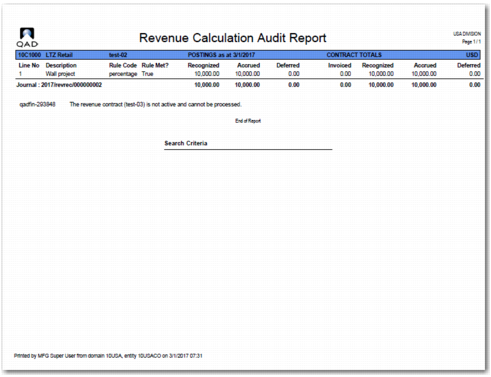
When you click Calculate, Revenue Calculation finds the revenue contracts that fall into the user-defined criteria and runs the revenue calculation for the contracts. The revenue calculation then automatically produces a report that details the results of the run, as displayed in
Audit Report.
The report displays the revenue contracts that have had revenue deferred and contracts that have had revenue recognized. The report also displays the amounts of each performance obligation line, including the invoice, deferred amounts, accrued amounts, and recognized amounts, and whether the performance obligation was met. Where the report displays deferred or recognized amounts, the journal entry reference number is also printed. If a revenue calculation fails, the report lists the revenue contract along with the reason for the failure.
Important: The Revenue Calculation program processes revenue contracts as a whole. Therefore, you can run the program for a specific sales order and then find that revenue recognition postings have been created for other sales orders because they are linked to the same contract.
Audit Report
Deferral Postings
Deferral postings move revenue from the sales account—the one specified on the revenue contract—to a deferred revenue account. A deferral posting is created when the conditions of the revenue recognition rule are not met when the revenue calculation is run.
Individual posting lines are created for each invoice or credit note of the linked line of the performance obligation. When a linked line refers to a sales order line, it is possible that there are multiple invoices or credit notes. In this case, the revenue calculation creates a set of posting lines for each invoice or credit note.
When credit notes are linked to a performance obligation, the postings created for the deferral of revenue result in positive values on the postings lines.
Accrual Postings
Accrual postings are postings that move revenue from the sales account—as specified on the revenue contract—to an accrued revenue account. Accrual postings are only created if the performance obligation uses a percentage complete, periodic, or custom periodic rule and the conditions of the revenue recognition rule are not met when the revenue calculation is run.
Recognition Postings
Recognition postings move revenue from the deferred revenue account back to the sales account. These postings happen when the conditions of the revenue recognition rule defined on the performance obligation have been met.
Revenue cannot be recognized until all orders linked to a performance obligation meet the conditions defined by the revenue recognition rule. Therefore, when even one order linked to a performance obligation does not meet the conditions of the revenue recognition rule, the revenue as a whole must remain deferred.
As with deferral postings, individual posting lines are created for each invoice or credit note of the linked line of the performance obligation. When a linked line refers to a sales order line, it is possible that there are multiple invoices or credit notes. In this case, the revenue calculation creates a set of posting lines for each invoice or credit note.
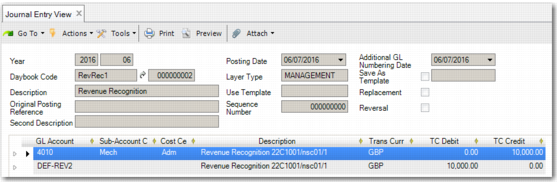
Journal Entry View – Invoice Recognition Postings displays the recognition postings for an invoice.
As with deferral postings, when the revenue of credit notes linked to performance obligations is recognized, the resulting postings contain positive values on the posting lines.
Journal Entry View – Invoice Recognition Postings