QAD 2017 Enterprise Edition
>
User Guides
>
Service/Support Management
>
Installed Base
>
Service Item Maintenance
Service Item Maintenance
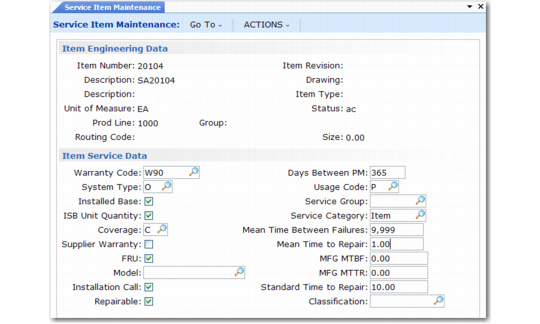
If you typically provide service for a well defined set of items, you can define service attributes for them with Service Item Maintenance (11.3.7). First define the items in Item Master Maintenance, even if Items Must Exist is No in Service Management Control. Use Service Item Inquiry (11.3.8) to review item service data.
If you set Service Data in Item Master to Yes in Service Management Control, these same frames display in Item Master Maintenance (1.4.1) and in Item Master Inquiry (1.4.2).
Service Item Maintenance (11.3.7)
Service Item Maintenance influences key service activities including managing the installed base, recording service activity in Call Activity Recording, determining coverage for items in the installed base, the creation of installation calls, and definition of standard service BOMs and routings.
For example, to add inventory items automatically to the installed base during sales order shipment, set them up with the Installed Base field in Service Item Maintenance set to Yes. This indicates to the system that the service organization supports this item and prevents cluttering the installed base with items the organization does not service.
If Ship to Installed Base is Yes (11.24), many service attributes are used when Invoice Post and Print creates an installed base record. If SO Edit ISB Defaults is Yes in Sales Order Control (7.1.24), you can change the default values when you generate the sales order. Otherwise, the system creates the record in the background using default values. To make changes later, use Installed Base Item Maintenance (11.3.1).