Installed Base
Service/Support Management (SSM) enables service organizations to maintain information about the products they sell or service and the individuals who own them. Collectively, this information is the installed base (ISB). This chapter introduces business considerations related to the installed base and describes how to manage it.
Understanding Basic TermsDescribes the installed base and its functions.
Business ConsiderationsExplains which decisions must be made when implementing Service/Support Management.
End UsersExplains how to set up and define end users in End User Create (27.20.3.1) and End User Data Maintenance (11.9.1), maintain schedules, and delete end user records.
Implementing the Installed BaseExplains prerequisite decisions that lead up to tracking the installed base and how to use it.
Service Item MaintenanceExplains how to use Service Item Maintenance (11.3.7) and certain data frames associated with it.
Service Item by Site MaintenanceExplains Service Item by Site Maintenance (11.3.9) the order in which the system determines sites.
Creating Installed Base RecordsDescribes the installed base and illustrates how to create records and maintain the installed base.
Installed Base UtilitiesDescribes how SSM provides three utilities for installed base needs.
ISB Item Tracking History ReportDescribes the functions of the ISB Item Tracking History (11.3.22.5) and ISB Item Tracking History Report (11.22.3).
Understanding Basic Terms
The installed base is a repository of information about items and the organizations that own and use them. An installed base record links three essential elements: an item, the customer who purchased it, and an end user. It also maintains details about an item, including serial number, installation date, warranty coverage, and how often maintenance is required.
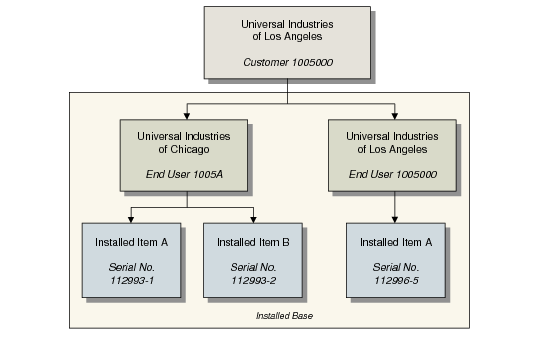
The customer is the organization that purchased the item, and represents the parent record to which end users and installed items relate. Each end user must be linked to a customer and, in turn, each installed item must be linked to an end user. As shown in
Installed Base Records, the customer can also be an end user.
Installed Base Records
When the installed base is updated from sales orders, the customer is the sold-to address in Sales Order Maintenance. If you do not sell directly to customers but market your products through retail outlets, you can define a single customer record to use as a place holder in this relationship.
End users are the people who most often use an item, request maintenance for it, and report problems. When the installed base is updated from sales orders, the end user is the ship-to address in Sales Order Maintenance (7.1.1). The end user is not necessarily the customer.
Each customer can have many end users, but a given end user is linked to only one customer. Typically, the end user possesses the item, even though it might have been purchased by the main office.
Example: A parent company buys a forklift and ships it to a warehouse. The parent company is the customer. The warehouse is the end user. The warehouse did not buy the forklift, but uses it at that location. Someone at the warehouse usually reports service problems.
A customer can also be the end user, but an end user cannot exist by itself—it must be linked to a valid customer record. The end user is always connected to the customer who purchased the item that the end user possesses.