Invoice Sort Maintenance
Use Invoice Sort Maintenance (11.21.5) to define and maintain invoice sort codes.
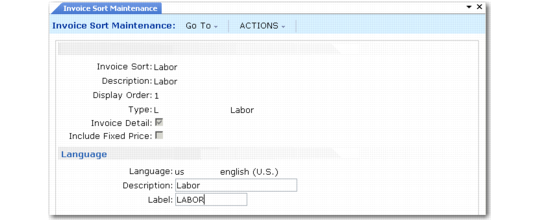
Invoice Sort Maintenance (11.21.5) shows a sample invoice sort for labor.
Invoice Sort Maintenance (11.21.5)
Invoice Sort
Enter a code identifying this invoice sort.
Description
Enter a brief description (maximum 24 characters) of the code identifying its use and purpose.
Display Order
Enter a numeral from 1 to 6 representing the display sequence in the Billing Summary frame of Call Invoice Recording. A warning displays if another invoice sort has the same display order.
Type
Possible values are L for labor, E for expense, and I for item. Type determines the column where costs display in the Call Invoice Recording summary frames. Labor costs display in column 1; item costs in column 2; and expense costs in column 3.
The invoice sort type also determines which service categories you can associate with it. You can associate a type L invoice sort with labor and travel labor service categories, a type I invoice sort with items, consumable items, or exchange items, and a type E invoice sort with expense or travel expense.
Invoice Detail
Determines the default in the Detail column in the Billing Summary frame of Call Invoice Recording and affects the printed invoice format. If Yes, the printed invoice displays information for each line of activity recorded in CAR. If No, the system summarizes the lines for a particular invoice sort with totals only. This means that if you consumed five items, the total cost for the five items displays, without details about the cost of each.
You can also set invoice detail per end user. The end user value overrides the invoice sort value.
Include Fixed Price
If this is Yes, Call Invoice Recording includes fixed price repair amounts in output for this invoice sort. Set only one invoice sort to Yes. Since fixed prices are charged regardless of the cost of items, labor, or expenses and regardless of the service categories in Call Activity Recording, do not associate service categories with this invoice sort.
Language Frame
Invoice sorts control the invoice display in Call Invoice Recording and invoice print. Use the language frame to specify how the label for the invoice sort should appear in different languages. If you do not set up language-dependent labels, the system uses the first 14 characters of the invoice sort description for the label in the Billing Summary frame of Call Invoice Recording.
Language and Description
Enter any valid language code defined Language Create (36.4.1.1). This field is required. After you enter a language code, you can specify a description and language-specific label.
If you use more than one language, execute the description and label sequence for each language you use. The description and label then appear properly translated for users in each language.
Description
Specify a general description of this invoice sort for the current language. For example, if the invoice sort applies to expenses, this description field might be “General Expenses.”
Label
The string in this field appears in the Call Invoice Recording Billing Summary frame as the label for this invoice sort when you are using this language. It displays in the position you specify in the Display Order field.