QAD 2017 Enterprise Edition > User Guides > Service/Support Management > Service Setup > Invoice Sort Codes > Example in Call Invoice Recording
  
Example in Call Invoice Recording
To understand how invoice sorts appear in Call Invoice Recording, consider this scenario. A company sets up the invoice sort codes shown in Sample Invoice Sort Codes.

Sample Invoice Sort Codes
 
Label
Display Order
Type
Detail
LABOR
1
L
No
Expenses
2
E
No
Items
3
I
No
Fixed
4
E
No
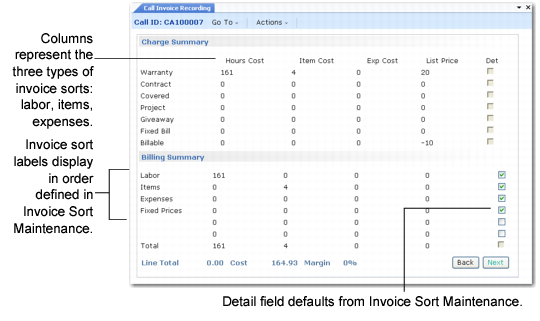
The summary frames in Call Invoice Recording would look like Summary Frames in CIR.

Summary Frames in CIR
The Billing Summary frame displays the labels of the invoice sorts you specify in Invoice Sort Maintenance. The Det column reflects the value for the Invoice Detail field.
See Call Invoice Recording.