Charge Codes
Charge codes play an important role in managing the financial impact of service activity. The charge code determines who pays for service costs, depending on which fields are Yes.
A charge code has one of seven possible attributes. Each attribute has a particular effect. Charge codes determine whether the system:
• Invoices service to the customer—billable and fixed billable
• Provides it free of charge—warranty, contract, covered, or giveaway
• Tracks it internally against a special project—project mandatory
Normally, you should create at least one charge code for each attribute to cover all possible business applications. However, if you do not use fixed pricing or track service costs for internal projects, these charge codes may not be needed.
Important: After you define charge codes, be careful about changing them. If you change a charge code marked Billable, for example, to Project Mandatory, it is no longer valid for contract limit records, as a billable default, and may be invalid in Call Activity Recording. You will now generate errors if you access records using the charge code.
Application of Charge Codes
Charge codes affect numerous functions:
• Service Limits. You can associate under- and over-limit charge codes with the various limits for a service type or contract. When this service type or contract provides coverage in CAR, the system uses the charge codes from the limits first. If you have not associated charge codes with limits, you can define default charge codes in Default Charge Code Maintenance.
• Recording Service. CAR suggests a charge code for each line of detail recorded, providing you maximum flexibility to manage financial impacts.
• Service Invoicing. When CAR summarizes service costs, the seven rows represent the seven types of charge codes.
• Product Lines and Accounts. Charge codes can be associated with a product line in Charge Product Line Maintenance. You can segregate the cost of different kinds of service activity by connecting the various charge codes with different product lines. For example, you can direct the cost of warranty service to different accounts than the cost of contract service. Charge codes can be used in this way in Call Activity Recording and for expensed material orders.
Charge Code Maintenance
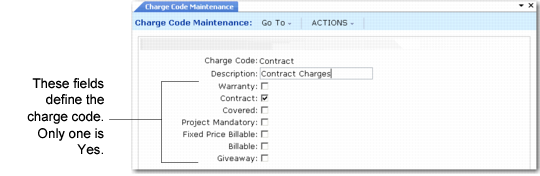
Use Charge Code Maintenance (11.21.21.1) to create and maintain charge codes.
Charge Code Maintenance (11.21.21.1) shows a charge code for service provided under contract.
Charge Code Maintenance (11.21.21.1)
Charge Code
Enter a code identifying a charge code.
Description
Enter a brief description (maximum 24 characters) of the code identifying its use and purpose.
Note: Only one of the remaining choices in Charge Code Maintenance can be Yes. This setting determines the effect of the charge code.
Warranty
Yes means the original warranty covers the charges. If Warranty is Yes, the charge can be the under-limit charge code on a warranty type. It can also be the default warranty charge code in Default Charge Code Maintenance.
When the system uses this charge code, it examines the limits on the warranty type and uses the level of coverage to determine how much to invoice the customer. The system does not use limit amounts with warranties—just the percent of coverage. Service charges are accumulated only against contracts and contract line items.
Contract
Yes means an existing, valid contract covers the charges. You can specify a charge code with Contract set to Yes as the under-limit charge code on a contract or contract type. It can also be the default contract charge code in Default Charge Code Maintenance.
When the system uses this charge code, it examines the limits on the contract and uses the limits and level of coverage to determine how much to invoice the customer. The system uses the limits on the contract line, then the contract header, and finally the contract service type.
Covered
Yes means either a generic service type or the default call service type in Call Management Control covers the charges. You can specify a charge code with Covered set to Yes as the under-limit charge code on warranty or contract types. It can also be the default covered charge code in Default Charge Code Maintenance.
Important: Use this kind of charge code carefully, and only on service types that provide coverage apart from specific contracts or warranties. Never use it on service types that are the basis of contracts or warranties.
Normally, you use Covered only for the Call Default Service Type in Call Management Control. If you have alternate generic service types, you can also use Covered for them. A warning displays in Contract and Warranty Type Maintenance when you specify a covered charge code. A Covered charge code on a service type used as a warranty or as a basis for contracts can create confusion in Call Activity Recording.
When the Covered charge code is an override in Call Activity Recording, the system applies the levels of the default call service type. If, for example, you normally provide some level of coverage as a goodwill gesture, override a Billable charge code with Covered to provide that level of coverage for an item in Call Activity Recording.
The system uses the coverage levels of the default service type but not any limit amounts. Service charges are accumulated only against contracts and contract line items.
Project Mandatory
Yes means you are using this charge code to track internal charges related to a particular company project. You cannot use this charge code unless you specify a project in CAR. You cannot use a charge code with Project Mandatory set to Yes as an under- or over-limit charge code on warranty types, contract types, or contracts. You can only use it as an override in CAR.
Note: Set up projects in Project Create (25.3.11.1.1).
Fixed Price Billable
Yes means you are using this charge code to track fixed-price service. The system suggests a fixed-price billable charge code in CAR when you use a fixed price work code. The system invoices the customer the fixed price regardless of the actual cost of service. Fixed-price service is an alternative to service based on contracts and warranties. When you use the fixed price, no limits are examined.
When Fixed Price Billable is Yes on a charge code, you cannot use it as an under- or over-limit charge code on warranty types, contract types, or contracts, since you do not use fixed pricing in conjunction with service coverage. However, you can specify it as the default fixed-price billable charge code in Default Charge Code Maintenance.
Billable
Yes means the system invoices the charges to the customer. You can specify a charge code with Billable set to Yes as the over-limit charge code on a contract or service type. You can also specify it as the default billable charge code in Default Charge Code Maintenance. Once service limits are exceeded, the system suggests the over-limit charge code. When you use a Billable charge code in Call Activity Recording, the covered amount is always zero.
Giveaway
Yes means the customer receives the service without any charge, and the system does not accumulate costs against any service limits in effect. You cannot use a charge code with Giveaway set to Yes as an under- or over-limit charge code on warranty types, contract types, or contracts. You can only specify it as an override in Call Activity Recording.