Charge Product Lines
Every item must be associated with a product line when you define it in the item master. The product line determines the general ledger accounts for financial transactions. You can further break down GL accounts by using Sales Account Maintenance or Inventory Account Maintenance. However, the service environment has special accounting needs.
Many service organizations do not want service costs and revenues included with manufacturing costs and item sales revenue. They need detailed reports that show the costs incurred by service under various conditions.
To address these accounting needs, define charge and revenue product lines to direct costs and revenue to accounts based on service-related factors.
Use Charge Product Line Maintenance (11.21.21.5) to set up product lines for service costs. Charge product lines can direct costs to different accounts depending on the charge code, the service type you associate with the call, the service category or work code of the usage detail, or the product line or service group of the item being repaired.
In the absence of charge product lines, the system uses a standard algorithm to determine the relevant product line, based on Use Item Prod Line in SSM Accounting Control. If this is Yes, the system uses the product line of the item being repaired; if No, the product line of the service type associated with the item being repaired. In both cases, if a product line is still not found, the default accounts in Domain/Account Control (36.9.24) are used.
Important: Since accounting is such an important part of a business endeavor, carefully plan how you use product line accounts in service.
Simple or Complex
Your setup of charge product lines can be relatively simple or complex, depending on how you apply your business practices. You can direct service costs to one product line. Or, at the most complex, you can use all fields, including charge code, work code, service category, service type, item product line, and service group.
Most companies find a policy between the two extremes best meets their needs. For example, relating product lines to charge codes is one effective way to distinguish and report on costs.
The system searches key fields for charge product lines from the bottom up, and you must fill them without skipping any. For example, if you want to use service category as part of the search algorithm, you must also specify work code and charge code.
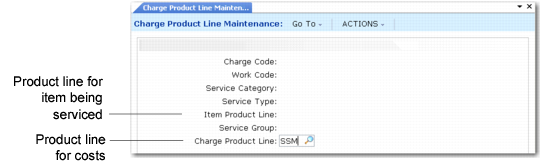
Charging All Service Costs to One Charge Product Line
Leaving the other fields blank means that the system charges service costs to the accounts in product line SSM, regardless of the charge code, work code, service category, service type, item product line, or service group.
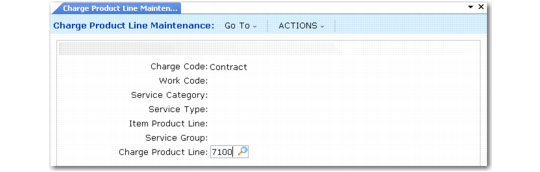
Breaking out Service Costs for a Charge Code
In this example, all costs for service contract activities are charged to service product line 7100. Use this kind of setup to see how costs are distributed between contract, warranty, and billable service.
Charge Product Line Maintenance Fields
When Call Activity Recording searches for a charge product line, it derives the values for charge code, work code, service category, and service type from each line of detail. It derives the value for item product line and service group from the item for which you are providing service.
Charge Code
Enter a valid charge code defined in Charge Code Maintenance. This field can be blank, but if so, all remaining key fields must also be blank. If you enter a value here, the system uses the associated charge product line for the cost of details recorded in CAR only when this charge code is on the line of detail.
Work Code
Enter a work code defined in Work Code Maintenance. This field can be blank, but if so, all remaining key fields must also be blank. If you enter a value here, the system uses the associated charge product line for the cost of details recorded in CAR only when this work code is on the line of detail.
Service Category
Enter a service category defined in Service Category Maintenance. This field can be blank, but if so, all remaining key fields must also be blank. If you enter a value here, the system uses the associated charge product line for the cost of details recorded in CAR only when this service category is on the line of detail.
Service Type
Enter a service type defined in Contract or Warranty Type Maintenance. This field can be blank, but if so, all remaining key fields must also be blank. If you enter a value here, the system uses the associated charge product line for the cost of details recorded in CAR only when this service type is in effect for the line of detail.
Item Product Line
Enter a product line defined in Product Line Maintenance. This field can be blank, but if so, Service Group must also be blank. If you enter a value here, the system uses the associated charge product line for the cost of details recorded in CAR only when you repair items belonging to this product line.
Note: This is the product line of the item being repaired, not the item issued as part of the repair.
Service Group
Validated against codes you set up in Generalized Codes Maintenance for field pt_svc_group. However, this field can be blank even if a blank generalized code does not exist. If you enter an invalid value, a warning displays. The system does not use the data you are about to create unless you set up this value in Generalized Codes Maintenance.
If you enter a value here, the system uses an associated charge product line for the cost of details recorded in CAR only when you repair items belonging to this service group.
Note: This is the service group of the item being repaired, not the item issued as part of the repair.
Charge Product Line
Enter a product line defined in Product Line Maintenance. The system uses the accounts associated with this product line for the cost of details recorded in CAR when the other key fields match.