Default Charge Codes
You can specify charge codes while you record activity in Call Activity Recording. However, to streamline recording, the system always attempts to suggest the most appropriate charge code.
When you define warranty and service types, you can specify a default under- and over-limit charge code. The system looks for these first. If you do not use these, you can set up default charge codes in Default Charge Code Maintenance (11.21.21.13). If no defaults exist, users recording activity must supply them manually in CAR.
The defaults defined with Default Charge Code Maintenance are useful for service environments with a minimum of service level combinations. A simple service environment can use a few sets of default codes for everything. For more detailed control, specify under- and over-limit charge codes on your service types.
Default Charge Code Maintenance
You can define five default charge codes for any combination of service type, work code, service category, and end-user type. These four fields are the key used by the system when it searches for an appropriate default. If it does not find an exact match, it searches for less specific matches.
Leave the key fields blank to create a generic set of default charge codes the system can apply in all cases.
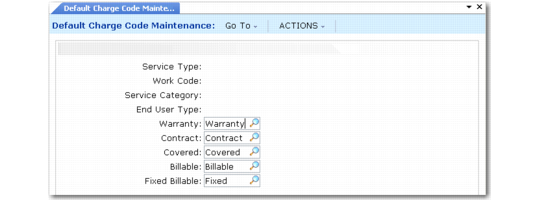
Default Charge Code Maintenance (11.21.21.13)
Service Type
Enter a service type defined in Contract or Warranty Type Maintenance. This field can be blank. If you enter a value here, CAR suggests the associated default charge codes only when this service type is in effect for the line of detail.
Work Code
Enter a work code defined in Work Code Maintenance. This field can be blank. If you enter a value here, CAR suggests the associated charge codes only when this work code is on the line of detail.
Service Category
Enter a service category defined in Service Category Maintenance. This field can be blank. If you enter a value here, CAR suggests the associated charge codes only when this service category is on the line of detail.
End User Type
This field is normally validated against values in Generalized Codes Maintenance for field eu_type. However, it can be blank even if a blank value is not defined. If you specify an invalid value, a warning displays. The data you are setting up has no application in the system unless you create this code later.
If you enter a value here, CAR suggests the associated charge codes only when the type of the end user initiating the call matches.
Warranty
Enter a charge code defined in Charge Code Maintenance with Warranty set to Yes. CAR suggests the warranty charge code only if a warranty type is providing coverage.
Contract
Enter a charge code defined in Charge Code Maintenance with Contract set to Yes. CAR suggests the contract charge code only if a contract is providing coverage.
Covered
Enter a charge code defined in Charge Code Maintenance with Covered set to Yes. CAR suggests the covered charge code only if coverage for the call line is being provided by the default call service type or some other service type you enter.
Billable
Enter a charge code defined in Charge Code Maintenance with Billable set to Yes. CAR suggests the billable charge code when no coverage is provided by the current service type or service has consumed the limits on a contract.
Fixed Billable
Enter a charge code defined in Charge Code Maintenance with Fixed Price Billable set to Yes. CAR suggests the fixed billable charge code whenever you use a fixed price work code.
Example Default Charge Code Setup
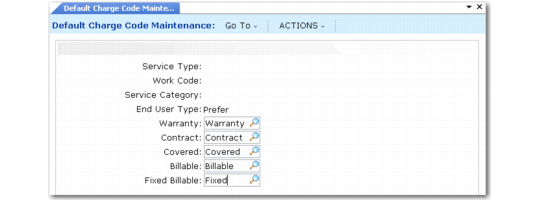
You can create a set of default charge codes for a special kind of end users using the End User Type field. In the example in
Sample Default Charge Code for Preferred Customer, the system suggests this charge code regardless of the service type, work code, or service category.
Sample Default Charge Code for Preferred Customer
Search Order
During processing in CAR, the system looks for default charge codes with any combination of values in the key, in the sequence listed in
Search Order for Default Charge Codes.
Search Order for Default Charge Codes
Search Order | Service Type | Work Code | Service Category | End User Type |
1 | | | | |
2 | | | | |
3 | | | | |
4 | | | | |
5 | | | | |
6 | | | | |
7 | | | | |
8 | | | | |
9 | | | | |
10 | | | | |
11 | | | | |
12 | | | | |
13 | | | | |
14 | | | | |
15 | | | | |
16 | | | | |