QAD 2017 Enterprise Edition
>
User Guides
>
Service/Support Management
>
Service Setup
>
User Preferences
User Preferences
SSM offers a number of ways to streamline data entry when you take a call by predefining default field values. You specify some of the values in control programs. These settings determine defaults for all users. You can also set up call defaults using Call Default Maintenance based on work code, model, and service group.
However, in some cases, each user may want to determine a default value used when they execute a program. Use Service/Support User Preferences (11.21.23) to enter values for individual users. Users must have been previously defined in User Maintenance (36.3.1).
See
Call Default Precedence Rules for details on how default settings are used.
Note: For more control, apply system security so only managers can set up user preferences.
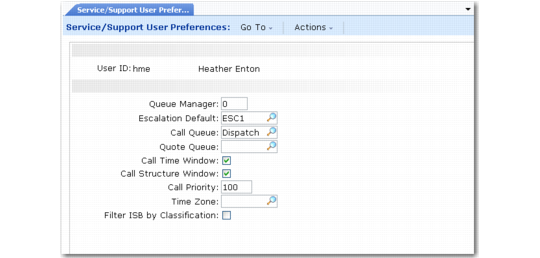
Service/Support User Preferences (11.21.23)
User ID
Enter a user ID defined in User Maintenance (36.3.1). You do not have to be logged in as the user; managers can set appropriate defaults and restrict users from changing them.
Queue Manager (0, 1, 2, 3)
Specify a value for managing the sort criteria for calls displayed in Call Queue Manager (11.1.6). This value overrides the value in Call Management Control.
0 (zero): Displays calls by next date and next time. Pivot sorts by end user.
1: Groups calls by the Assigned (engineer) field, then response priority. Pivot sorts by Queue.
2: Sorts by the Assigned (engineer) field. Pivot sorts by end user.
3: Sorts by the Area field. Pivot sorts by customer.
Note: Each Queue Manager value has a primary and secondary sort view. You use the Pivot command to switch between the two views.
Escalation Default
Enter the default escalation code for Call Maintenance (11.1.1.1). Leave this field blank if you do not use call escalation. When this user creates a call, this setting overrides the default in Escalation Control. However, if the end user has an escalation or one is defined in Call Default Maintenance, it is used first.
Note: Use Escalation Maintenance (11.1.13.1) to set up escalation codes.
Call Queue
Enter a code used to group service calls for dispatching and review with the Queue Manager. When this user creates a call, this setting overrides the default set in Call Management Control. A queue set by an escalation or in Call Default maintenance takes precedence over this value.
Note: Use Call Queue Maintenance (11.1.21.7) to set up call queues.
Quote Queue
Enter a code used to group call quotes. When this user creates a quote, this setting overrides the default in Call Management Control. A queue set in Call Default Maintenance takes precedence.
Call Time Window
Specifies whether the Travel and Estimated Time window appears in Call Maintenance. Enter Yes to record the estimated call length, travel distance, and travel time in Call Maintenance (11.1.1.1). When this user creates a call, this setting overrides the default in Call Management Control.
Call Structure Window
Specifies whether the Repair Structure Detail window appears in Call Maintenance. If Yes, a frame displays in Call Maintenance (11.1.1.1) where you can specify or modify the service BOM and routing. When this user creates a call, this setting overrides the default in Call Management Control.
Call Priority
Enter a number indicating how important this call is. Lower numbers indicate higher priority. In order of precedence, the value in the Priority field defaults from:
• The Call Priority field in End User Data Maintenance.
• If this field is zero, then depending on whether the item is covered under a warranty or service contract, the default comes from the Priority field in either Warranty Type Maintenance or Contract Type Maintenance.
• If the item is not covered under warranty or contract, the default is the priority of the Default Call Service Type in Contract Control.
• The system uses user preferences if none of the above apply.
Filter ISB by Classification
Specify whether you want this user to be able to filter ISB records based on classification codes when displaying ISB lookups.
No: All ISB records are displayed.
Yes: You can select a classification code to limit records included before an ISB browse displays.
The value of this setting affects all programs that have a field with an associated installed base lookup.
This field defaults from Service Management Control. If user preferences are not defined for a user, the control value is used.