Service Coverage Frame
Once you define the header information for the service type, you can specify the days and hours of coverage.
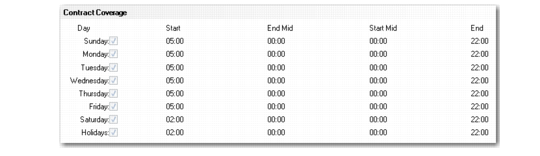
Contract Coverage Frame
Use the End Mid and Start Mid fields to define a single break in the coverage for the day, such as a lunch period. The system considers the interval between the times defined in the End Mid and Start Mid fields as non-covered time. If you do not define a break, the system assumes that coverage is available from the time indicated at start of the day until the end of the day
To define coverage from 9:00 until 17:30 with an hour for lunch, you create a service contract type that has service coverage starting at 09:00 and ending at 13:00 for the first period of the day, beginning at 14:00 and ending at 17:30 hours for the second period of the day. To indicate 24-hour coverage, enter a range of 00:00 to 23:59. In most processor time clocks, 00:00 is the same as 24:00. To indicate no coverage, enter a range of 00:00 to 00:00. Call Maintenance uses service coverage in conjunction with Response Time to schedule the call’s next status date and next status time.