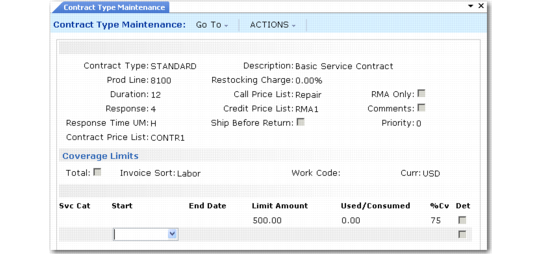
Coverage Limits Frame
Specify coverage limits in one of three ways:
1 Set Total to Yes to specify a total amount covered.
2 Enter a value in the Invoice Sort field to specify limits for a particular invoice sort.
3 Enter a value in the Work Code field to specify limits for a work code and service category combination.
You can enter a value in only one of these three fields at a time. Typically, a service organization chooses to track costs by invoice sort or by work code and service category, although it is possible to combine the two methods.
Coverage Limits Frame
Total
If Yes, the value in the Amount column defines a limit to charges accumulated on a contract using this service type. The percentage of coverage and other data apply as a generic record when no other applicable record exists.
Invoice Sort
If you specify a value here, the limit data applies to this invoice sort. A value in the Amount column indicates a total for the service categories associated with this invoice sort, regardless of the work code.
Work Code
If you specify a value here, also specify a service category. Use any work code except a work code with fixed price set to Yes. The associated limit data applies to this work code and service category combination.
Curr
For contract types and warranties, the domain base currency displays. For contracts, the contract currency displays. The system converts the amounts from base currency to contract currency.
Svc Cat
Specify a service category when you enter a work code in the previous frame. The associated limit data applies to this work code and service category combination.
Start and End Date
Determines the effective period for these service limits. One or both dates can be blank, in which case the system considers the limits open ended. The system prevents you from creating overlapping effective dates.
Amount
A value expressed in the domain base currency indicating a preset limit on coverage. You cannot update this field if Contract Limits is No in SSM Accounting Control.
Used/Consumed
Display-only field that is not used for contract and warranty types. When limits are consumed on an actual contract, the amount posted against that limit (consumed), or recorded in Call Activity Recording (used), displays in this field.
%Cv
The coverage percent determines how much of a particular charge is covered and how much you can invoice. If labor costs $200 dollars and %Cv is 75%, $150 is covered and the system applies it to any limit.
Det
Indicate whether you want to be prompted for limit detail.