Determining GTM Tax Defaults
Global Tax Management (GTM) uses five data elements in determining taxes: tax status, tax class, tax environment, tax included, and tax usage.
Call Header Defaults
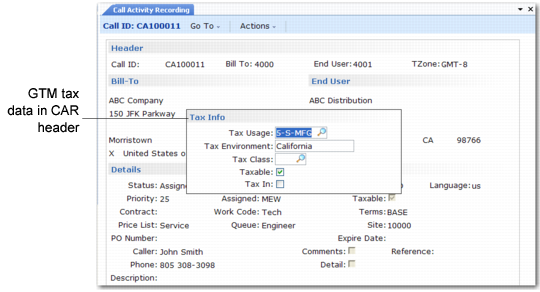
When a call is taxable, you can review and modify the five GTM data elements in a pop-up that displays in the Call Activity Recording header. These elements default from the end user on the call.
GTM Tax Data in CAR Header
The From and To zone values associated with a call and the tax class of the To address determine the tax environment for the call header.
• For all call activity, the geographical location of the end user—county, city, and country—determine the To zone value.
• The tax class is the class associated with the end user in End User Create.
• The From zone is the site associated with the call header.
Under GTM, you must define each site in Company Address Maintenance to make the required geographic values available. If you do not define the site on the call header as an address, the system uses default values defined in Global Tax Management Control to determine the From zone. The same logic is used in other order functions such as sales orders and purchase orders.
Note: If you are using the interface to Vertex’s Quantum™ for Sales and Use Tax to calculate taxes, the system also checks the work code when determining tax zones. See Technical Reference: Sales and Use Tax Interface.
Call Line Defaults
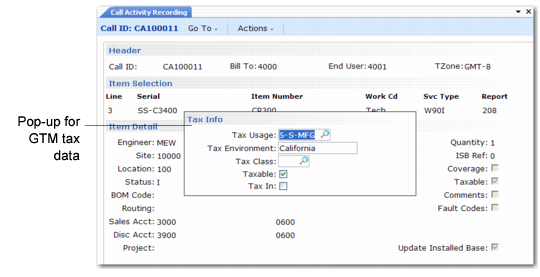
Most of the information at the call header defaults to the call line. Another GTM pop-up displays in Call Activity Recording at the call line level, enabling you to review and modify call line item tax elements.
GTM Tax Data for CAR Line Item
If you change the site associated with the call line from the call header site, the system recalculates the default tax environment.
Note: You cannot modify the information in this pop-up if an invoice for the call exists. Once a pending invoice exists for the line, you can edit tax details only in CIR.
If this is a fixed price service activity, the call line elements determine the final tax calculation. No usage details are considered.
Call Usage Detail Defaults
The user does not enter any tax information for call usage records in CAR. However, the system sets up default values you can edit in CIR. The system applies the tax usage and tax included attributes of the call line by default to the usage detail records for that line.
Here again the system bases the tax environment on the To zone value—always the end user’s zone—and the From zone value. The site associated with the detail usage record determines the From zone. This is the site where items are located or the site associated with labor and expense consumption. This site defaults from the call line, but can be changed in CAR for individual usage records.
The taxable status and tax class for the usage records default for items from the values in Item Master Maintenance or from Service Category Maintenance for labor and expense service categories.
Important: If the call line is not taxable, the system ignores these lower-level details.