Reviewing and Editing Taxes
Review and edit tax records in the Call Invoice Recording trailer, just like in a sales order trailer. If Update Tax Allowed is No for the tax rate in effect, you cannot edit tax amounts.
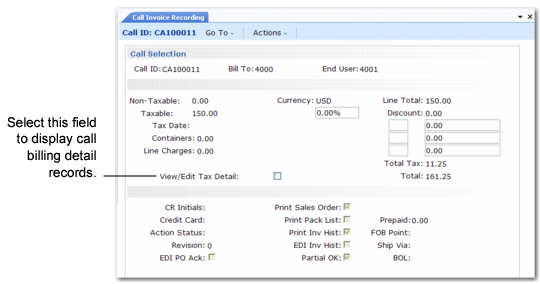
Trailer Frame in CIR
If View/Edit Tax Details is Yes, another frame displays call billing details.
Trailer Frame in CIR
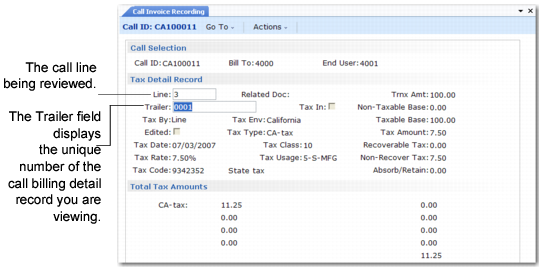
In a standard sales order, the Trailer field has a value only when you are viewing or editing trailer codes. Trailer codes are associated with line 99999. In Call Invoice Recording, the Trailer field also displays the index number of the billing detail record associated with the call line being reviewed.
Example: You record three lines of labor and four items used for a call line. The system creates seven billing detail records numbered 01 through 07. You can review the tax amount for each separately.
The system creates tax detail records for items first, then details for labor and expenses sorted by invoice sort.
If you modify taxes, the system prompts you to recalculate taxes whenever the invoice is regenerated or whenever you access the trailer frame in CIR. If you have changed the call line in CAR, you normally respond Yes to this prompt so the system taxes any new transactions correctly. Recalculating the taxes, however, eliminates any modifications you have made.
Printing Call Invoices
If Print Tax Detail on Reports is Yes in Global Tax Management Control (29.24), tax detail is included by the invoice print function. This setting affects call invoices in the same way it affects sales order invoices.