Contract Workflow
The service contract manages billing issues regarding the repair, replacement, and support of an item. These issues arise in:
• Call and Call Quote Maintenance, where problems are registered with the support department
• Call Activity Recording, where service activity in response to a call is recorded, including labor, expenses, and items consumed
• Preventive Maintenance (PM), an optional feature of Contract Maintenance that schedules service calls in advance for items under contract
• Return Material Authorization (RMA) Maintenance, where you receive items from an end user and issue replacement items
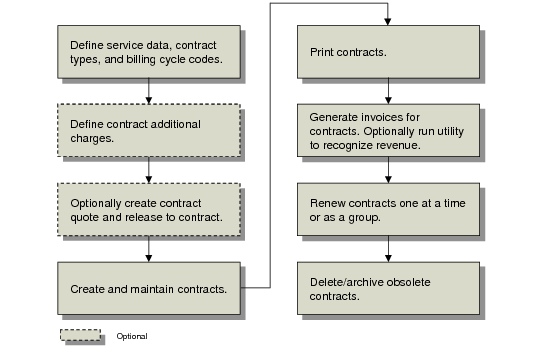
Contract Workflow outlines a typical contract workflow.
Contract Workflow
To use contracts, follow these steps:
1 Make sure you have set up the base service data required before you can create contracts, such as customers, end users, service item information, work codes, service categories, and invoice sorts. Define appropriate defaults and controls in Contract Control (11.5.24) and SSM Accounting Control (36.9.10).
2 Use Contract Type Maintenance (11.5.10) to define contract types reflecting service values you typically incorporate in your contracts. Set up other codes such as billing cycles in Billing Cycle Code Maintenance (11.5.18.1).
3 If needed, set up additional charge items in Contract Additional Charges (11.5.7).
4 Many organizations go through a review process before a contract becomes effective. To do this, use Contract Quote Maintenance (11.5.1.1) to create contract quotes, print them using Contract Quote Print (11.5.1.3), and send them to the customer. After a quote is accepted, release it to a contract using Contract Quote Release to Contract (11.5.1.5).
Note: In Contract Quote Print, the country for the sold-to customer determines the numeric and date formats.
If you use quotes, you can streamline the creation of new quotes by copying existing quotes or contracts using Contract Quote Copy from Quote (11.5.1.6) or Contract Quote Copy from Contract (11.5.1.7). You can also generate them from contracts during renewal as part of running Renewal Process/Report (11.5.13.10).
5 If you do not prepare quotes, create contracts directly in Contract Maintenance (11.5.13.1), or copy them from existing contracts using Contract Copy to Contract (11.5.13.5). Print them using Contract Print (11.5.13.4).
6 Depending on your billing process, release contracts to invoicing at appropriate intervals using Billing Release to Invoice (11.5.18.13). This activity creates pending invoices that are managed in the Sales Orders/Invoices module. Depending on your accounting practices, you may also need to run Revenue Recognition (11.5.18.21). For details, see
here.
7 A contract remains in effect until the specified end date. Renew contracts that have been fully invoiced to extend their coverage. Do this one at a time using Renew Single Contract (11.5.13.8) or use the auto-renew feature to renew groups of expired contracts with Renewal Process/Report (11.5.13.10).
8 You can archive and delete fully billed, expired contracts from the system using Contract Delete/Archive (11.5.13.23). The system checks to make sure no active calls reference a contract before it is deleted. The delete/archive can also include quotes.