Viewing Contract Consumption History
Two reports give you an overview of how limit amounts have been consumed.
Limits Consumption Inquiry
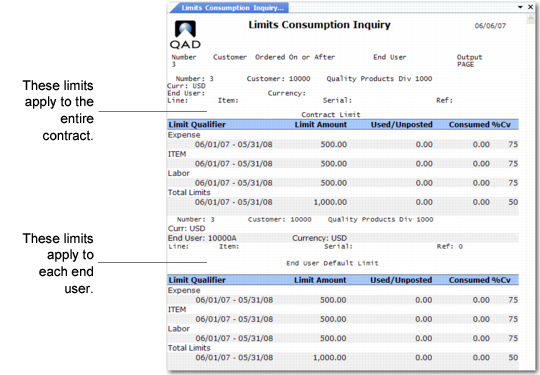
The Limits Consumption Inquiry (11.5.13.21.4) displays consumption for limits selected by contract number, customer, order date, and end user.
Limits Consumption Inquiry (11.5.13.21.4)
When an end user is specified, limit consumption for that end user only is listed in the output. In this case, no consumption for contract-wide limits displays, since these limits are not associated with an end user.
When an end user is specified, limit amounts are expressed in the end user’s currency.
This inquiry shows limits at all levels of a contract. The limit frame title identifies the kind of limit: contract, end-user default, item default, and detail.
• The kind of limit displays under the Limit Qualifier heading. This can be an invoice sort, a work code and service category combination, or a limit set for the total (Total Limits).
• The limit amount displays in the Amount column. Contract and default item limits are in the contract currency. End user and detail item limits are in the end-user currency.
• The Used column displays amounts recorded in Call Activity Recording but not yet consumed through invoice post. These amounts are subject to change. For example, modifying the covered amount or the charge code in CAR may change the amount the system uses against this limit.
• The Consumed column displays amounts posted against this limit by call invoices.
• The %Cv column displays the level of coverage for this coverage limit.
Limits Consumption Report
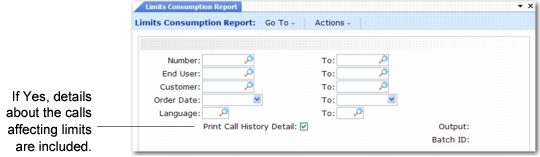
The Limits Consumption Report (11.5.13.21.5) provides information similar to the inquiry with additional options.
Limits Consumption Report (11.5.13.21.5)
Selection criteria include ranges of contract numbers, end users, customers, contract (order) dates, and contract languages. If Print Call History Detail is Yes, information about each call that affected the limits is included in the report.
Note: Call detail is available to the system only when Record Limits History is Yes in SSM Accounting Control.
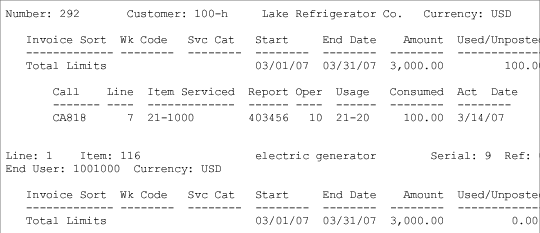
The limits consumption report is more detailed than the inquiry. The following sample shows only the first seven columns of information reported.
Limits Consumption Report Output
The report uses separate columns to display the invoice sort or work code and service category used to define the limits. The other columns display similar amounts as the inquiry.
Note: The system uses the call open date to search for effective limits.
Call detail includes the call number, line affecting the limit, item for which service was provided, operation, component part or service category used on that call line, the amount consumed (posted), and the activity date. The date in the call history detail is the date the system used to search for effective limits, which is the call open date.