QAD 2017 Enterprise Edition
>
User Guides
>
Service/Support Management
>
Service Contracts
>
Contract Additional Charges
Contract Additional Charges
You can add additional charges to a contract at both the contract and end-user level. The display of frames for defining additional charges in Contract Maintenance depends on settings in SSM Accounting Control (36.9.10):
• When End User Additional Charges is Yes in SSM Accounting Control, the frame displays for end users.
• When Contract Additional Charges is Yes in SSM Accounting Control, the contract-wide frame displays.
Define additional charges in Contract Additional Charges (11.5.7).
Contract Additional Charges (11.5.7)
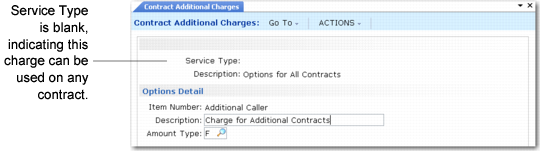
Set up additional charges for a particular contract type by specifying a value in the Service Type field. If you leave Service Type blank, the additional charges are available for use on contracts with any service type.
The amount type for an additional charge can be F for fixed amount, the default, or P for percentage. A fixed additional charge represents an amount added to or subtracted from the contract trailer. A percentage additional charge is a markup or discount applied to the total for the items covered on the contract.
To automate pricing, define the prices for additional charge items on a contract service price list. The amount type of the additional charge determines the kind of price list you can define.
Adding an Additional Charge illustrates adding an additional charge in Contract Maintenance.
Adding an Additional Charge
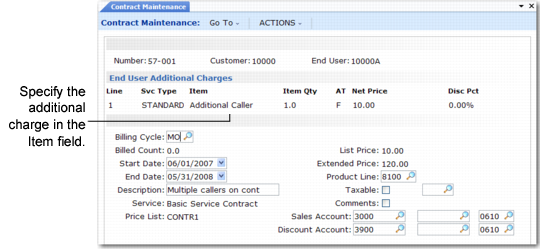
Set up the additional charge item, Additional Caller, in Contract Additional Charges with a fixed type. Then, specify it in one of the additional charges frames of Contract Maintenance—either end user or contract wide. The system retrieves its amount type (F) and derives its price from the price list associated with the line. In this case, the price is $10 per month. The system derives the extended price by multiplying the net price by the number of months of coverage, in this case 12.
When modifying or editing additional charge lines, the system applies the same edits as it does for contract lines.
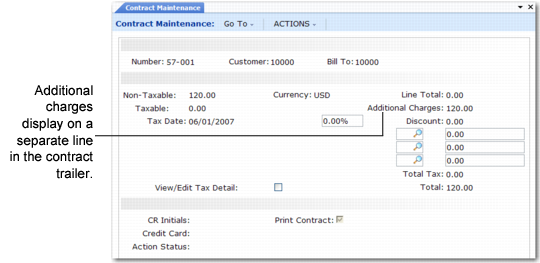
The total additional charge displays in a separate line on the contract trailer and on the contract invoice. If End User Totals is Yes in SSM Accounting Control, the total additional charge for the end user displays in the End User Total frame.
Additional Charge Displays on Trailer