Renewing Contracts Automatically
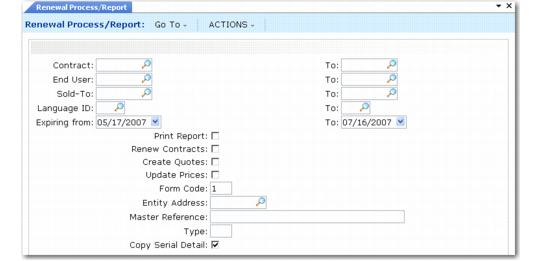
Use Renewal Process/Report (11.5.13.10) to review contracts near expiration and optionally generate service quotes or renew contracts at old or new prices. To be included in the renewal process, a contract line must meet the following conditions:
• It must be fully invoiced.
• Auto Renew must be set to Yes.
Renewal Process/Report (11.5.13.10)
Note: The login country of the user determines the numeric and date formats.
Based on date ranges or other selection criteria, you can perform multiple functions with this program:
• Print reports showing contract lines that will expire within a range of dates.
• Automatically create quotes based on existing contracts, optionally updating prices. You can then mail the printed quotes to the customer or end user for approval and release approved quotes to contract. You can include a renewal letter by setting one up in master comments and specifying the master reference when quotes are generated.
Quotes are created with an Action Status of A. This indicates that the quote was created through automatic renewal and prevents it from being released to a contract before review. To release the quote to a contract, remove the A from the Action Status field.
• Automatically renew contract lines with Auto Renew set to Yes, optionally updating prices.
Note: Define the default for Auto Renew in End User Data Maintenance (11.9.1).
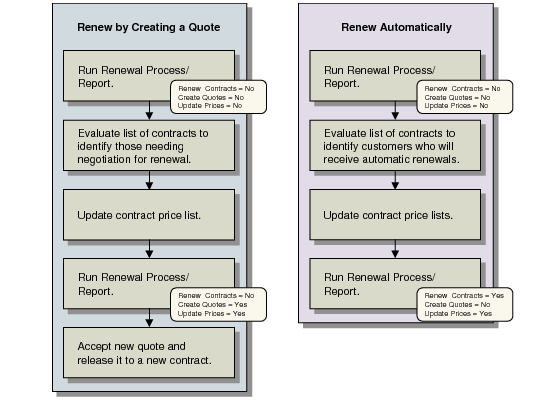
Renewing Contracts illustrates two methods for renewing contracts, one using quotes and one going directly from contract to contract.
Renewing Contracts
Renewal Process/Report resets the start and end dates on the contract, so the start date is the day after the expiration date of the original contract. The end date defaults from the service type’s duration. The billing process continues as usual, using the new dates. Contracts are always renewed with a new number. The system retrieves the next available number from Contract Control.
Note: To ensure consistent results, execute the report function first and review the output before attempting to create quotes or renew contracts.
You can run this function multiple times for the same contract for different ranges of end users. However, each time you do this a new contract is created. If you want the renewed contract to look like the old one, you must include all end users in the range when you process renewals or leave the end-user range blank.