Billing Cycles
You bill some contracts monthly, some quarterly, and some annually. To identify different billing cycles, create and maintain codes in Billing Cycle Code Maintenance (11.5.18.1).
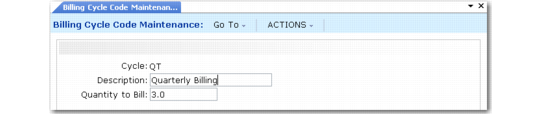
Billing Cycle Code Maintenance (11.5.18.1)
The Quantity to Bill value represents the number of months in the billing cycle. When a contract is released to invoice with this billing cycle, the system calculates the invoice amount by multiplying the unit price by the number of units covered, and then multiplying this amount by the number of months in this billing cycle (Quantity to Bill).
Example: For a quarterly billing cycle code, set Quantity to Bill to 3, billing three months of service each quarter.
Always enter a whole number for the quantity to bill, since a contract cannot be billed more than once in a month.
Specify a default billing cycle in SSM Accounting Control. This value supplies a default for the Billing Cycle field on the contract header when contracts are created. Billing cycle can be modified at multiple levels of a contract: contract header, default end user and items, and item details.
You can accept the default or specify a different billing cycle code at various levels below the contract header. However, you cannot specify a cycle that indicates less frequent billing than the cycle specified on the header. For example, the header billing cycle is annual. You cannot specify a billing cycle of every two years for a contract line.
You can delete a billing cycle code only if it is not currently referenced by any contracts or quotes.
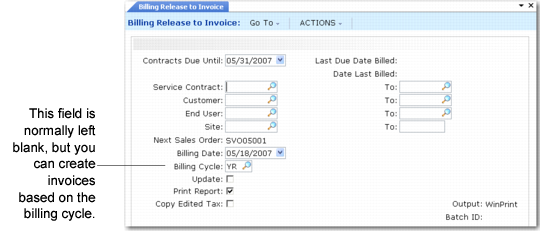
You can use the billing cycle as a selection criterion in Billing Release to Invoice (11.5.18.13), illustrated in
Selecting a Billing Cycle to Release. However, it is best to bill all cycles together. Enter a date in the Contracts Due Until field. Select a date greater than or equal to the date to be billed.
Selecting a Billing Cycle to Release