Contract Deferred Income Report
Contract Deferred Income Report (11.5.13.21.2) provides information about deferred and accrued income for invoiced contracts when you are not using Revenue Recognition. This usually does not apply to monthly contracts; it is more significant for quarterly and annual contracts billed in advance.
This report is useful if you have contracts with a cash basis revenue type that are not billed in arrears. When the payment for the entire period is received in advance, only a small portion can be recorded as income. The balance must be recorded, via a manual journal entry, into a liability account. Since you still owe the coverage for the future, you cannot declare it as actual income.
The deferred income report enables the accountant to take a periodic look at contracts to determine how much revenue they must accrue, and how much they can record, via a journal entry, as actual income.
To handle deferred revenue automatically, set up contracts with a revenue type of deferred. Then use Revenue Recognition to create the appropriate GL transactions on a regular basis.
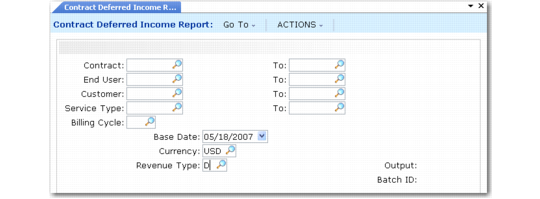
Contract Deferred Income Report (11.5.13.21.2) illustrates Contract Deferred Income Report (11.5.13.21.2).
Contract Deferred Income Report (11.5.13.21.2)
Select contracts for reporting by range of contract number, end user, customer, service type, and billing cycle. Base Date defaults from the system date. It is used to determine the number of days of contract coverage that have already been provided.
Optionally, you can enter a valid currency code to limit the selection to contracts associated with that currency. If you specify a currency code, all amounts display in that currency. Otherwise, amounts display in base currency.
Use the Revenue Type field to limit the report to contracts with accrued, cash basis, or deferred revenue. Leave the field blank to include all revenue types.
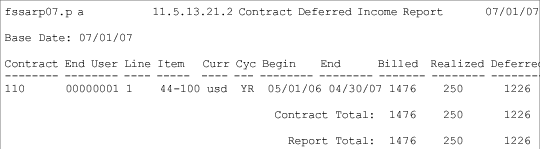
Sample Deferred Income Report illustrates a sample report. The report displays one line for each contract line and a line for the contract total.
Sample Deferred Income Report
Contract 110 has one item, for a monthly amount of $123.00. The total billed for this contract is $1476.00, 12 months in advance. This is indicated by the YR billing cycle code—Cyc column on the report.
The contract begins coverage on 05/01/07 (Begin) and ends coverage on 04/30/08 (End). Using 07/01/07 as its base date, the Start Date specified when the report was run, the report program performs the calculations listed in
Calculating Deferred Income.
Calculating Deferred Income
Calculated Amount | Results |
Contract Total Amount = | Billed |
Billed / 365 days = | Daily Amount |
Covered Days = | Base Date - Begin Date |
Realized = | Covered Days * Daily Amount |
Deferred = | Billed – Realized |
Using the actual values from the sample report,
Deferred Income Amounts shows the calculations.
Deferred Income Amounts
Calculated Amount | Results | Actual Amounts |
Contract Total Amount = | Billed | 1476.00 |
Billed / 365 days = | Daily Amount | 4.04 |
Covered Days = | Base Date – Begin Date | 182 – 94 = 62 |
Realized = | Covered Days * Daily Amount | 4.04 * 62 = 250.00 |
Deferred = | Billed – Realized | 1476.00 – 250.00 |