Scheduling Visits for a Line Item
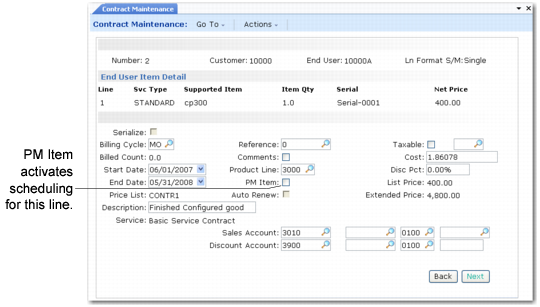
The PM Item field in Contract Maintenance must be Yes to set up preventive maintenance schedules for individual line items. This field defaults to Yes if Days between PM is any nonzero value for the item in Service Item Maintenance (11.3.7).
Setting PM Item to Yes in Contract Maintenance (11.5.13.1)
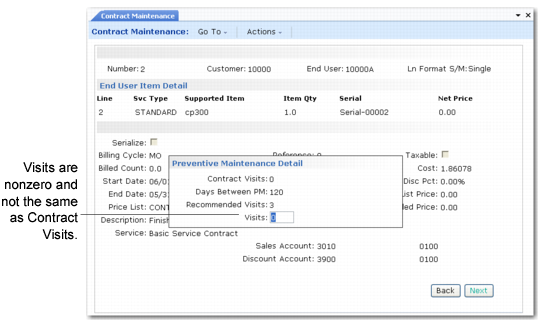
A Yes in the PM Item field activates a PM detail pop-up window.
Generating a Line-Item Schedule
If this contract is for end users with items, the Contract Visits field displays the value of the Visits field on the header. In item/end-user sequence, the Contract Visits field is always 0 (zero), since the field cannot be updated on the header.
The effect of the line-item Visits field varies depending on the value of Item End Users. When Item End Users is No:
• Leave the default 0 (zero) or enter the same number of visits as the end-user schedule to add this item to the calls created for the end user.
• Enter any other value to create a separate schedule for the item. The item schedule displays before the end-user schedule.
If Item End Users is Yes, an end-user schedule does not exist. Enter any nonzero value to create a PM schedule for this line item.
To help you determine how many visits to schedule for this item, the system displays the Days Between PM value specified for this item in Service Item Maintenance. Based on this number of days and the duration of the contract, the system recommends a number of visits.
PM Item and Visits Field Settings summarizes the settings for the PM Item and Visits fields when Item End Users is No.
PM Item and Visits Field Settings
Desired Effect | PM Item | Visits |
Exclude item from preventive maintenance | No | N/A |
Include item in end-user PM schedule | Yes | 0 or same value as specified on contract header |
Generate separate PM schedule for this item | Yes | Any integer other than contract header value |