Using BOM Type
You can set up any number of service BOMs for a single item in Service Structure Maintenance (11.19.5). Similarly, you can set up multiple routings in Service Routing Maintenance (11.19.17). Service BOMs list the items normally used during a service activity, and the routings list the steps to follow.
However, you can associate only one PM BOM and routing with an item in Service Item Maintenance (11.3.7). The system uses this PM BOM and routing by default when a PM call is created.
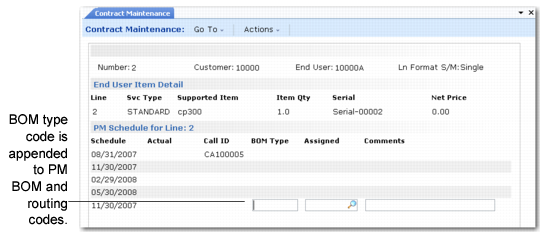
You may have slight variations on a standard PM BOM and routing depending on how often you service the covered item. The BOM type enables you to create variations of a standard BOM and routing based on a type code. Use the BOM Type if you have more than one standard PM BOM and routing. Set up BOM types in Generalized Codes Maintenance for field sap_bom_type.
Contract Line-Item PM Schedule Frame
Your standard BOM and routing may be slightly different for an annual visit, a quarterly visit, or a monthly visit. You can create three BOM types—A for annual, Q for quarterly, and M for monthly—and associate the appropriate one with the scheduled date. When the call is generated, the system determines the PM BOM and routing associated with the item in Service Item Maintenance. Then it appends the BOM type letter to this code.
Example: Service item 113 is defined in Service Item Maintenance with a PM BOM code of 113-pm and a PM routing code of 113-pm. Now, in the scheduling frame of Contract Maintenance, you specify a quarterly BOM type (Q). The system-generated PM call would specify a BOM and routing code of 113-pmQ.
For this feature to work correctly, the BOMs and routings must have been created with Service Structure Maintenance and Service Routing Maintenance.