Calls for End User Pop-Up
When you are creating a call for an end user with other open calls, you are prompted to display them. If you respond Yes, you are prompted to display call line item detail. Open calls are not complete, canceled, or on hold.
You can view calls at the call level or the line item level. The call level provides high-level information about the call; the line item level shows information related to the specific items on the call, such as part number and serial number.
In either window, select a call by pressing Enter. This replaces the call you were about to create with the one you select. This feature helps to prevent creating redundant calls in the system. If the call you are taking is about a different item, you can add it to the existing call.
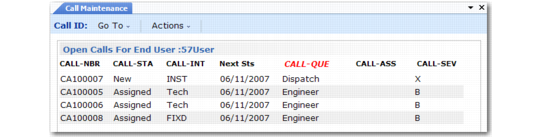
The following lookup displays if you choose not to display call line-item detail. It displays call-level information.
Open Calls For End User
Selecting a call from this lookup replaces the record you were about to create with the selected record. You can use the Pivot command to alternate the sort order of the display between queue and assigned engineer.
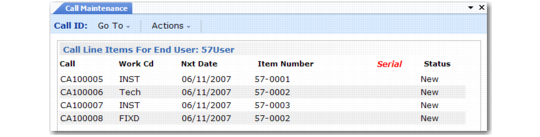
If you respond Yes to display call line item detail, a different view of the call information displays.
Call Line Items For End User
Use Pivot to alternate the sort order of the display between item number and serial number.
Note: If you have entered a serial number in the Call Maintenance header, the system shows you call lines for items with a serial number the same as or greater than the one you entered.