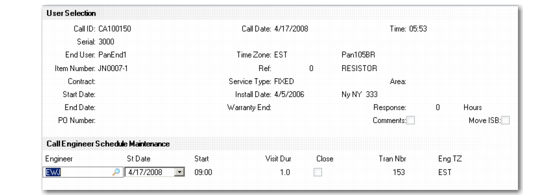
Call Engineer Schedule Maintenance Frame
If Schedule is Yes and you select an engineer, the Call Engineer Schedule Maintenance frame displays.
Use this frame to edit the default scheduling information for this engineer. It is similar to the frame displayed in Engineer Assignment Maint (11.13.15.8), where you can modify the same data. Multiple transactions can exist for one engineer. Use the Next/Previous keys to display all the transactions.
Call Engineer Schedule Maintenance Frame
Note: When MTZ is active, the system enters the scheduled start date and time in the end user’s time zone, which displays in the Call Maintenance header frame.
St Date
Defaults from Next Status Date on the call header, but can be modified. If only one engineer transaction exists for a call, updating this field also updates the call’s Next Status Date value.
Start
Defaults from Next Status Time on the call header, but can be modified. If only one engineer transaction exists for a call, updating this field also updates the call’s Next Status Time value.
Hours
The estimated number of hours required for this engineer to complete the call. Defaults from the Estimated Length field. If only one engineer transaction exists for a call, updating this field also updates the call’s estimated length.
Close, Tran Nbr
Output-only field of the call transaction number and a Yes/No field indicating if this call transaction number has been closed.
Eng Area
Displays the service area associated with the engineer.
Note: If MTZ is active, this column is replaced by engineer time zone.