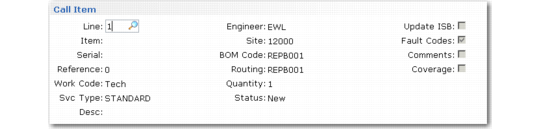
Call Item Frame
If Multi-Items is Yes, the Call Item frame displays so you can update information for each line item.
Call Item Frame
Call Line
The line number associated with this item on the call.
Item, Serial, Reference
Uniquely identifies the item being repaired. The reference is the ISB reference number. These fields cannot be updated once you open a report for the item in Call Activity Recording.
Work Code, Engineer, Site
These fields default from the call header, but can be changed for each line item. If this is a new line and you change the engineer, the default site is recalculated based on information for this engineer. Once the record is created, changing the engineer does not change the site.
Svc Type
The system calculates this field based on the item entered. If the item is currently covered by a contract or warranty, the associated service type displays by default. Otherwise, the system uses the default call service type from Call Management Control. This field cannot be updated once you open a report for the item in Call Activity Recording.
BOM Code, Routing
These default from the BOM codes and routings defined first for the item in Service Item by Site Maintenance, then in Service Item Maintenance, based on the work code specified.
Quantity
For an item not in the installed base, quantity defaults to one, but can be modified. If the item added to the call already exists in the installed base, its ISB quantity displays by default. This field cannot be updated once an open report exists for this call line in Call Activity Recording.
Status
This field can be security protected. Displays the current status of the call line. The call line status is important in Call Activity Recording and determines whether the detail recorded for the line should be included on the call invoice.
Normally, the system sets the line status in CAR. The status is available in Call Maintenance to give you added flexibility and control. Each line on a call can have a different status. For example, you can cancel one line found to be unnecessary, while leaving other lines open.
Update ISB
Use this field to decide for each line item on the call if the system should add it to the installed base, overriding other settings. It defaults to Yes when:
• The item is already in the installed base. In this case, Update ISB defaults to Yes regardless of other settings.
• The Installed Base field in Service Item Maintenance is Yes for the item, and the Create ISB field is Yes for the current end user in End User Data Maintenance.
• The item is not defined in the item master, but Create ISB is set to Yes for the current end user in End User Data Maintenance.
Note: The value of Create ISB for a new end user defaults from the Create ISB field in End User Control.
If the item has been set up in the Item Master as serial or lot-number controlled and a number is not specified, the system sets Update ISB to No and it cannot be changed. Lot and serial-controlled items must be added to the installed base with an appropriate number. If the Item field is blank, Update ISB also defaults to No.
Fault Codes, Comments
These fields are the same as the comparable fields for the first call line in the Call Update frame.
Coverage
Defaults from Coverage Window in Call Management Control. If Coverage is Yes, the following frame displays coverage information.